

Introduction
Choosing the right website builder can make a major difference to how quickly a business launches online, how professional it appears, and how easily it can scale over time. In this Elementor Review, we explore whether Elementor still deserves its reputation as one of the most popular WordPress website builders for startups, freelancers, bloggers, and small businesses in 2026.
For many founders and sole traders in the UK, creating a professional website used to require hiring a developer or learning complicated coding skills. Elementor changed that by introducing a visual drag-and-drop editor for WordPress that allows users to design pages in real time. Whether you are launching an ecommerce store, portfolio, agency website, SaaS landing page, or company homepage, Elementor aims to simplify the design process while still giving users extensive flexibility.
One reason Elementor continues to attract attention is its balance between usability and customisation. Beginners can use ready-made templates and design kits, while more advanced users can build highly customised layouts with animations, responsive controls, dynamic content, and marketing integrations. This flexibility has made Elementor for startups especially appealing, as early-stage businesses often need affordable tools that can grow alongside them.
If you want to try Elementor, you can explore the latest plans here: https://startupdeals.co.uk/recommends/elementor
It is also worth noting that Elementor is available in both free and paid versions. The free version offers enough functionality for many basic websites, while Elementor Pro introduces advanced widgets, ecommerce tools, theme building capabilities, and premium support. For many users comparing Elementor for small businesses against alternatives like Divi, Wix, Squarespace, or Beaver Builder, the main question is whether the premium upgrade delivers enough value to justify the cost.
Throughout this elementor review, we will examine Elementor pricing, performance, ease of use, design flexibility, templates, integrations, ecommerce functionality, and support quality. We will also cover Elementor pros and cons in detail, helping you understand where the platform performs well and where it may fall short for certain business types.
If discounts or promotional pricing are mentioned, availability and eligibility may vary over time.
By the end of this elementor review, you should have a much clearer understanding of whether Elementor is the right website-building solution for your business in 2026.
Contents
What Is Elementor?
Elementor Review: Core Features Explained
Who Is Elementor Best For?
Key Benefits of Elementor
How To Build a Website With Elementor
Elementor Pricing Explained
Elementor Performance & Speed
Elementor vs Competitors
Elementor Pros and Cons
Support, Integrations & Security
Elementor Offers & Pricing Information
General FAQs
Recap
Conclusion
What Is Elementor?
Elementor is a visual website builder plugin for WordPress that allows users to design pages using a drag-and-drop interface instead of relying entirely on code. Since its launch, Elementor has become one of the most widely used WordPress page builders globally, powering millions of websites across blogs, ecommerce stores, startup landing pages, agency sites, and business portals.
At its core, Elementor simplifies website creation. Instead of editing content through the default WordPress editor, users can visually build pages in real time. This means you can drag widgets onto a page, customise layouts, adjust colours and typography, and immediately see how the final design will look.
For startups and small businesses, this approach can dramatically reduce the time and cost involved in launching a website. Elementor for startups is particularly popular because founders can create professional-looking websites without hiring expensive web developers during the early stages of growth.
Elementor includes a wide range of widgets and design tools, including:
- Headings and text blocks
- Buttons and call-to-action sections
- Contact forms
- Image galleries
- Testimonials
- Pricing tables
- Ecommerce product layouts
- Popups and lead generation forms
- Responsive mobile controls

The free version offers a strong starting point for beginners, while Elementor Pro unlocks advanced features such as Theme Builder, WooCommerce Builder, Popup Builder, motion effects, custom CSS, and dynamic content capabilities.
Another major reason Elementor remains competitive is its extensive template ecosystem. Users can choose from professionally designed page templates, full website kits, and reusable blocks that accelerate the design process. This makes Elementor for small businesses attractive because it allows companies to launch polished websites quickly without starting from scratch.
From a technical perspective, Elementor works on top of WordPress rather than replacing it. This means users still benefit from WordPress flexibility, plugin compatibility, and ownership over their website. Unlike some fully hosted builders, Elementor allows users to maintain more control over hosting, SEO, and site customisation.
However, Elementor is not perfect for every user. Some websites may experience performance slowdowns if pages become overloaded with animations or widgets. This is why understanding Elementor pros and cons is essential before committing to the platform long term.
Overall, Elementor positions itself as a highly flexible website builder that bridges the gap between beginner-friendly simplicity and advanced design functionality. For many UK businesses in 2026, that balance continues to make it one of the most appealing WordPress tools available.
Elementor Review: Core Features Explained
One of the main reasons Elementor continues to dominate the WordPress builder market is the depth of features available across both the free and premium plans. In this section of our Elementor Review, we examine the core tools and capabilities that make the platform attractive to startups, bloggers, agencies, and growing businesses.
The visual drag-and-drop editor remains Elementor’s standout feature. Users can build pages visually by placing elements exactly where they want them. Unlike traditional WordPress editing experiences, Elementor provides a live preview while editing, which significantly improves workflow efficiency.
Another major advantage is the sheer number of widgets included. Elementor provides content widgets, marketing widgets, ecommerce tools, and design components that allow users to create complex pages without coding knowledge. Popular widgets include forms, sliders, countdown timers, testimonials, image carousels, pricing tables, and social media integrations.
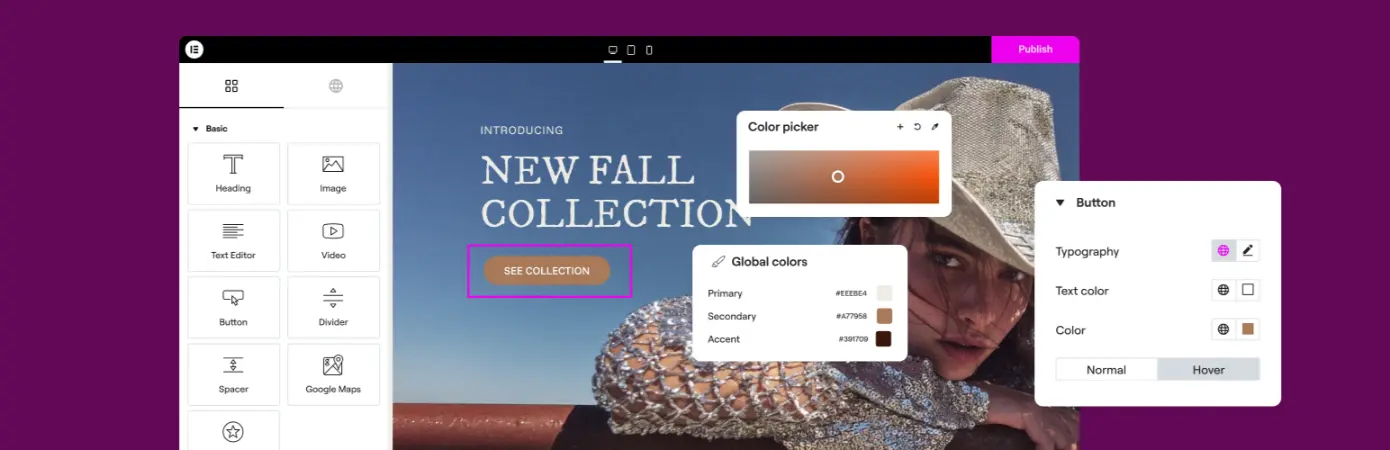
For businesses focused on branding consistency, Elementor’s global styling tools are particularly useful. Users can define typography systems, colours, spacing rules, and reusable design settings across the entire website. Elementor for small businesses benefits greatly from this feature because it helps maintain a professional and consistent appearance across all pages.
Elementor Pro also introduces Theme Builder functionality, which allows users to customise headers, footers, blog templates, archive pages, and dynamic site sections. Instead of being limited by a WordPress theme, businesses gain far more control over how their website looks and behaves.
WooCommerce integration is another important feature for ecommerce users. Elementor enables businesses to design custom product pages, checkout layouts, shop archives, and promotional sections visually. This makes Elementor for startups appealing to founders launching online stores or digital product businesses.
Marketing functionality is also heavily integrated throughout the platform. Popup Builder allows users to create email capture forms, promotional banners, exit-intent campaigns, and announcement popups without relying on separate plugins. Integrations with platforms like Mailchimp, HubSpot, and Zapier further extend Elementor’s functionality.
Responsive editing tools are another strong point. Elementor allows users to customise layouts separately for desktop, tablet, and mobile devices. In a mobile-first environment, this flexibility can significantly improve user experience and SEO performance.
Despite these advantages, Elementor pros and cons should still be considered carefully. The extensive feature set can sometimes feel overwhelming for beginners, and poorly optimised designs may negatively impact loading speeds if users rely too heavily on animations or third-party add-ons.
Still, for many businesses seeking flexibility without needing advanced coding skills, Elementor offers one of the most comprehensive WordPress design experiences currently available in 2026.
Who Is Elementor Best For?
Elementor has evolved far beyond being a simple drag-and-drop website builder. In 2026, it is used by freelancers, ecommerce brands, agencies, content creators, consultants, and growing companies across a wide range of industries. However, while Elementor is flexible, it is not necessarily the perfect fit for every type of website owner. Understanding where the platform performs best is important before deciding whether it aligns with your business goals.
One of the strongest use cases for Elementor is startups. Elementor for startups works particularly well because it allows founders to launch professional websites quickly without large upfront development costs. Early-stage businesses often need flexibility, speed, and affordability, especially when validating ideas or testing new services online. Elementor enables users to create landing pages, marketing sites, lead generation funnels, and ecommerce stores without hiring a dedicated developer.

Freelancers and solo business owners also benefit heavily from Elementor’s design flexibility. Consultants, photographers, designers, coaches, and personal brands can build visually polished websites that reflect their branding while still maintaining full control over layout and functionality. The platform’s template kits further simplify the process, reducing the time required to launch client-ready pages.
For content creators and bloggers, Elementor provides significantly more creative freedom than the standard WordPress editor. Bloggers can design custom article layouts, email signup sections, promotional banners, and affiliate landing pages without touching code. This makes Elementor for small businesses especially useful for businesses using content marketing as part of their growth strategy.
Agencies are another major Elementor audience. Many web design agencies use Elementor because it accelerates website production while still allowing a high level of customisation. The ability to reuse templates, global design settings, and widgets across multiple projects can improve workflow efficiency substantially.
Ecommerce businesses can also benefit from Elementor when paired with WooCommerce. Store owners can customise product pages, promotional sections, and checkout experiences visually. For startups launching digital products or physical ecommerce brands, Elementor offers enough flexibility to create conversion-focused storefronts without fully custom development.
That said, Elementor may not suit every scenario. Large enterprise websites with highly custom backend functionality may require more advanced development frameworks. Similarly, users seeking an ultra-lightweight website focused purely on speed may prefer simpler builders or custom-coded themes.
When evaluating Elementor pros and cons, it becomes clear that the platform is best suited to users who want strong visual control without becoming dependent on developers. Businesses that prioritise design flexibility, ease of use, and scalability will often find Elementor to be a strong long-term solution.
Ultimately, Elementor’s broad appeal comes from its ability to serve both beginners and advanced users. Whether you are a startup founder launching your first business website or a growing company expanding your online presence, Elementor remains one of the most versatile WordPress website builders available in 2026.
Key Benefits of Elementor
There are many website builders available in 2026, but Elementor continues to stand out because of the balance it offers between simplicity, flexibility, and advanced functionality. For many users, the platform’s biggest strength is that it makes professional web design far more accessible without sacrificing too much control.
One of the biggest benefits of Elementor is speed of website creation. Traditional WordPress website development often requires technical knowledge, plugin management, and theme customisation. Elementor dramatically simplifies this process through its visual editor. Users can build pages in real time, making design changes instantly without constantly previewing or refreshing the website.
This efficiency is especially valuable for Elementor for startups. Early-stage businesses frequently need to launch websites quickly while keeping costs low. Instead of paying developers thousands of pounds for custom pages, startups can use Elementor templates and widgets to create polished websites independently.
Another major advantage is design flexibility. Elementor offers significantly more creative freedom than many standard website builders. Users can customise layouts, animations, typography, colours, responsive settings, and spacing with precision. This allows businesses to create websites that feel unique rather than relying entirely on generic templates.
The platform also provides strong scalability. Many users begin with Elementor’s free version before gradually upgrading to Pro as their requirements grow. This staged approach makes Elementor for small businesses appealing because companies can expand functionality over time without rebuilding their website from scratch.
Template libraries are another key benefit. Elementor includes hundreds of professionally designed templates and website kits that accelerate the design process considerably. Users can customise these templates to fit their brand instead of building every page manually. For non-designers, this can dramatically improve website quality while reducing development time.
Marketing tools integrated into Elementor also help businesses improve lead generation and conversion rates. Features such as Popup Builder, forms, countdown timers, testimonial sections, and ecommerce widgets allow users to create marketing-focused pages without relying heavily on third-party plugins.
Responsive editing functionality is another strong point. Elementor allows users to optimise layouts separately for desktop, tablet, and mobile devices. In a mobile-first online environment, this flexibility can improve user experience and potentially support SEO performance.
Of course, understanding Elementor pros and cons remains important. While the platform offers extensive flexibility, websites can become slower if users overload pages with animations, widgets, or unnecessary add-ons. Proper optimisation and quality hosting still matter.
For many businesses, however, the advantages outweigh the drawbacks. Elementor delivers a combination of accessibility, scalability, and creative control that few WordPress builders currently match. Whether you are a freelancer, startup founder, blogger, or ecommerce business owner, Elementor provides tools that can support long-term website growth effectively.
If you want to explore Elementor further, you can view available plans here: Elementor Official Website
How To Build a Website With Elementor
One reason Elementor has become so widely adopted is that it significantly reduces the complexity involved in building a professional WordPress website. Even users with minimal technical experience can create polished business websites by following a relatively straightforward setup process.
The first step is purchasing hosting and installing WordPress. Elementor works as a plugin within WordPress, so users will first need a live WordPress website before installing the builder itself. Many hosting providers now offer one-click WordPress installation, making the initial setup process relatively simple.
Once WordPress is installed, users can add Elementor directly through the WordPress plugin marketplace. The free version is available immediately, while Elementor Pro requires upgrading to a paid plan and activating a licence key.
After installation, users can begin creating pages using Elementor’s visual editor. Instead of editing content through traditional backend WordPress tools, Elementor provides a live editing environment where sections, widgets, and layouts can be customised visually.
For beginners, one of the easiest approaches is starting with a pre-designed template kit. Elementor provides templates for:
- Startup websites
- Agencies
- Ecommerce stores
- SaaS companies
- Portfolios
- Blogs
- Restaurants
- Local businesses
This makes Elementor for startups particularly practical because founders can launch attractive websites rapidly without needing design experience.
The next stage involves customising the website structure. Users can edit typography, colours, logos, layouts, and navigation menus to align with their brand identity. Elementor also allows responsive editing, enabling separate adjustments for mobile and tablet devices.
Businesses using WooCommerce can then integrate ecommerce functionality. Elementor Pro allows custom product pages, promotional banners, and checkout designs that improve branding consistency across online stores.
Marketing integrations are another important part of the setup process. Elementor supports email marketing platforms, CRMs, analytics tools, chat integrations, and lead capture systems. Businesses can connect forms directly to services such as Mailchimp or HubSpot to streamline lead generation.
As websites grow, users may expand functionality further using additional widgets or third-party Elementor extensions. However, moderation is important. One of the commonly discussed Elementor pros and cons is that excessive add-ons can negatively affect website performance if poorly optimised.
Before publishing, businesses should test website responsiveness, loading speed, and SEO settings carefully. Elementor works well with popular SEO plugins, allowing users to optimise metadata, page structure, and schema effectively.
Overall, Elementor makes website building significantly more accessible than traditional WordPress development. For many freelancers, startups, and growing companies, it provides an efficient way to create professional websites while maintaining flexibility and long-term scalability.
Elementor Pricing Explained
Pricing is one of the main reasons Elementor continues to attract freelancers, startups, and growing businesses in 2026. Unlike fully managed website builders that often bundle hosting, templates, and website functionality into one expensive monthly subscription, Elementor gives users more flexibility by separating website hosting from the page builder itself.
Elementor is available in both free and premium versions. The free version is surprisingly capable and allows users to build visually appealing pages using the drag-and-drop editor, responsive controls, and basic widgets. For hobby sites or simple landing pages, the free plan may be sufficient.
However, most businesses eventually upgrade to Elementor Pro because of the additional marketing, ecommerce, and design functionality it unlocks. Elementor Pro includes advanced widgets, Theme Builder, Popup Builder, WooCommerce tools, premium templates, motion effects, and dynamic content functionality.
For many users evaluating Elementor for startups, the pricing structure is attractive because businesses can start small and scale gradually over time. Instead of paying for enterprise-level functionality immediately, users can upgrade as website requirements become more advanced.
Pricing typically varies depending on:
- Number of websites
- Access to premium templates
- Hosting inclusion
- Ecommerce functionality
- Team collaboration features
- Support tiers
Businesses should also remember that Elementor itself does not replace hosting. Users normally still need:
- A domain name
- WordPress hosting
- Optional premium plugins
- Security tools
- Backup services
This is important when comparing Elementor for small businesses against all-in-one builders such as Wix or Squarespace. While Elementor may appear cheaper initially, the total website cost depends heavily on the hosting provider and additional tools selected.
That said, Elementor often provides better long-term flexibility and ownership compared to closed website ecosystems. Businesses maintain greater control over their website files, hosting choices, and scalability.
One important factor when considering Elementor pros and cons is licensing value. Elementor Pro licences can often become cost-effective for agencies or businesses managing multiple websites because a single subscription may support several domains depending on the chosen plan.
Another advantage is that users are not forced into lengthy contracts. Businesses can often test Elementor with minimal upfront investment before committing to larger projects.
For users wanting to explore Elementor pricing and available plans, you can view current options here: View Elementor plans
Ultimately, Elementor pricing remains competitive because it serves multiple levels of users effectively. Beginners can start with the free version, while growing businesses can unlock advanced functionality progressively as their website and marketing requirements expand.
Elementor Performance & Speed
Website speed remains one of the biggest considerations for businesses building online platforms in 2026. Fast-loading websites improve user experience, support SEO performance, reduce bounce rates, and can positively influence conversions. Because of this, performance is often one of the most debated aspects when discussing Elementor pros and cons.
Elementor has improved significantly over the years in terms of optimisation and loading efficiency. Earlier versions of the platform were frequently criticised for generating bloated code and slowing down websites. However, recent updates have introduced performance-focused improvements such as asset loading optimisation, improved CSS handling, lazy loading support, and reduced DOM output.
For many businesses, Elementor performance is now heavily influenced by how the platform is used rather than the builder itself being inherently slow.
Well-optimised Elementor websites can perform very well when paired with:
- High-quality hosting
- Lightweight themes
- Optimised images
- Limited third-party plugins
- Clean page structures
- Proper caching tools
This is particularly important for Elementor for startups because early-stage businesses often overlook technical optimisation while focusing heavily on design. Adding excessive animations, large video backgrounds, sliders, or poorly coded add-ons can negatively affect performance regardless of which website builder is used.
Elementor’s responsive editing tools also help improve mobile experiences, which remain critical for SEO and user engagement. Mobile optimisation is especially important for Elementor for small businesses, as local traffic and mobile-first browsing continue to dominate many industries.
Another positive aspect is Elementor’s compatibility with leading performance tools and content delivery networks. Businesses can integrate caching plugins, CDN services, and image optimisation platforms relatively easily within the WordPress ecosystem.
However, performance concerns should not be dismissed entirely. One of the more realistic Elementor pros and cons discussions centres around flexibility versus efficiency. Elementor offers extensive design control, but that flexibility naturally introduces additional code compared to lightweight custom-coded websites.
For highly performance-sensitive projects, experienced developers may still prefer minimalist themes or custom development frameworks. But for most startups, freelancers, bloggers, and SMEs, Elementor performance is generally more than sufficient when websites are built responsibly.
Businesses should also consider hosting quality carefully. Cheap hosting environments can create slow-loading websites regardless of how well Elementor itself is configured. Investing in reliable WordPress hosting usually has a greater impact on speed than changing page builders entirely.
Overall, Elementor now performs far better than many critics assume. While not the absolute lightest builder on the market, it provides a strong balance between visual flexibility and practical performance for the majority of business websites.
If you want to explore Elementor further, you can do so here: Explore Elementor
Elementor vs Competitors
Elementor operates in a highly competitive website builder market. Businesses comparing website platforms in 2026 often evaluate Elementor against alternatives such as Divi, Beaver Builder, Wix, Squarespace, Webflow, and the native WordPress block editor. Each platform offers different strengths depending on user priorities, technical experience, and website goals.
One of Elementor’s biggest advantages is flexibility. Unlike closed platforms such as Wix or Squarespace, Elementor operates within WordPress, giving users more ownership and scalability. Businesses can choose their own hosting provider, install third-party plugins, and customise their website far more extensively.
For Elementor for startups, this flexibility is valuable because businesses are less likely to outgrow the platform as they scale. Startups can begin with a basic site and gradually add ecommerce functionality, membership systems, booking tools, or advanced marketing integrations later.
Compared to Divi, Elementor is generally considered easier for beginners to use. The visual editor feels more intuitive, and the interface is often viewed as cleaner and more modern. Elementor also benefits from a very large ecosystem of third-party extensions and templates.
Beaver Builder, meanwhile, is often praised for stability and clean code output. However, many users find it less visually advanced than Elementor, especially when building highly customised landing pages or animated marketing content.
Webflow appeals more to advanced designers and developers who want greater front-end precision. While Webflow offers strong design flexibility, it also has a steeper learning curve. Elementor for small businesses may therefore be more approachable for non-technical users who want faster setup and easier ongoing management.
The native WordPress block editor has improved significantly over recent years, but it still lacks many advanced visual editing features available in Elementor Pro. Businesses wanting full design control without coding often still prefer Elementor’s interface.
When discussing Elementor pros and cons against competitors, performance is frequently part of the debate. Some alternatives produce cleaner code or lighter page structures. However, Elementor generally compensates with superior design flexibility, marketing functionality, and ease of use.
Pricing comparisons also vary considerably. Elementor’s modular approach means businesses can combine hosting and plugins according to their own budget, whereas all-in-one platforms may bundle everything into higher monthly fees.
Another major Elementor advantage is community size. The platform benefits from extensive tutorials, YouTube guides, Facebook groups, developer communities, and third-party marketplaces. This large ecosystem can make troubleshooting and learning significantly easier for beginners.
Ultimately, the best website builder depends on business priorities. Users seeking maximum simplicity may prefer Wix or Squarespace. Designers wanting advanced creative control may lean towards Webflow. But for businesses wanting a balance between affordability, flexibility, scalability, and ease of use, Elementor remains one of the strongest WordPress website builders available in 2026.
Elementor Pros and Cons
No website builder is perfect for every user, and Elementor is no exception. While the platform offers impressive flexibility and usability, there are also trade-offs that businesses should understand before committing long term. Reviewing Elementor pros and cons carefully can help determine whether the platform aligns with your website goals, technical requirements, and growth plans.
One of Elementor’s biggest strengths is ease of use. The drag-and-drop editor allows users to build professional-looking pages visually without coding experience. This dramatically lowers the barrier to entry for entrepreneurs, freelancers, and non-technical business owners.
For Elementor for startups, this ease of use can reduce launch costs significantly. Instead of hiring developers for every design change, founders can often manage updates internally, saving both time and money during early-stage growth.
Another major advantage is design flexibility. Elementor gives users detailed control over layouts, typography, spacing, colours, animations, and responsive behaviour. Compared to many basic website builders, Elementor enables far more customisation without requiring advanced development knowledge.
The template ecosystem is another important benefit. Elementor includes professionally designed templates and website kits that allow businesses to launch polished websites much faster. This is especially useful for Elementor for small businesses that want professional branding without building pages entirely from scratch.
WooCommerce integration is also a strong positive. Ecommerce businesses can visually customise product pages, checkout experiences, and promotional layouts without relying heavily on custom coding.
However, there are some drawbacks worth considering.
Performance can become an issue if Elementor is used carelessly. Heavy animations, excessive widgets, and poorly optimised add-ons may increase page load times. While Elementor itself has improved substantially, website speed still depends heavily on proper optimisation and quality hosting.
Another potential downside is plugin dependency. Websites built heavily around Elementor may become difficult to redesign later without rebuilding layouts entirely. Businesses planning major long-term website changes should be aware of this.
Pricing can also increase over time. While Elementor’s free version is generous, many advanced features require Elementor Pro. Businesses may also need premium hosting, security tools, SEO plugins, or third-party add-ons, increasing overall website costs.
Some advanced users and developers also argue that Elementor generates more code than lightweight custom-built websites. For highly performance-sensitive projects, this may be a consideration.
Still, for many businesses, the advantages outweigh the disadvantages substantially. Elementor continues to offer one of the best combinations of accessibility, scalability, and design flexibility within the WordPress ecosystem.
For users wanting to test Elementor themselves, you can explore the platform here: Get started with Elementor
Ultimately, Elementor works best for businesses that value creative freedom, rapid website development, and user-friendly design tools. For startups, freelancers, agencies, bloggers, and SMEs, it remains one of the strongest website-building solutions available in 2026.
Support, Integrations & Security
Beyond website design functionality, businesses also need reliable support, integrations, and security tools when choosing a long-term website platform. Elementor performs relatively well across all three areas, which helps explain why it remains widely adopted among WordPress users in 2026.
Support quality varies slightly depending on whether users are using the free or premium version. Free users mainly rely on community forums, tutorials, YouTube guides, and documentation. Fortunately, Elementor has one of the largest user communities in the WordPress ecosystem, meaning solutions to common problems are often easy to find.
Premium users gain access to dedicated customer support channels, including ticket-based assistance and troubleshooting resources. Businesses using Elementor for startups often benefit from this additional support because technical issues can be resolved more quickly during important growth periods.
Elementor’s documentation is also extensive. The platform provides setup tutorials, optimisation guides, feature walkthroughs, and developer resources covering most core functionality. Beginners generally find the onboarding process easier than many competing WordPress builders.
Integrations are another major strength.
Elementor works with a large number of third-party tools and services, including:
- WooCommerce
- Mailchimp
- HubSpot
- Zapier
- Stripe
- PayPal
- Google Analytics
- Yoast SEO
- Rank Math
- CRM platforms
- Membership plugins
- Booking systems
This flexibility is one reason Elementor for small businesses remains popular. Businesses can create websites that connect directly with their marketing systems, sales funnels, email campaigns, and ecommerce platforms without needing custom development work.
Another advantage is compatibility with most WordPress themes and plugins. While some conflicts occasionally occur with poorly coded third-party plugins, Elementor generally integrates smoothly within the wider WordPress ecosystem.
Security is also an important consideration. Because Elementor operates within WordPress, website security depends partly on the broader hosting environment and plugin management practices. Elementor itself regularly releases updates and security patches, helping reduce vulnerabilities over time.
However, businesses still need to implement broader website security practices, including:
- Strong passwords
- Secure hosting
- SSL certificates
- Regular backups
- Plugin updates
- Malware monitoring
One of the realistic Elementor pros and cons discussions involves plugin reliance. Since Elementor websites often use multiple plugins simultaneously, businesses must manage updates carefully to avoid compatibility or security issues.
Fortunately, Elementor’s popularity means security vulnerabilities are usually identified and patched relatively quickly compared to smaller platforms with less active development communities.
For most startups, freelancers, agencies, and SMEs, Elementor provides more than enough support and integration flexibility for long-term business use. The combination of community resources, premium support, and extensive compatibility continues to make Elementor one of the most practical WordPress website builders available today.
You can learn more about Elementor and its available plans here: View Elementor options
Elementor Offers & Pricing Information
Elementor pricing and promotional availability can change periodically throughout the year, especially during major online sales events or seasonal campaigns. Businesses considering Elementor should review current pricing carefully before selecting a subscription plan.
Elementor generally offers multiple pricing tiers depending on:
- Number of websites required
- Access to Elementor Pro
- Hosting inclusion
- Ecommerce functionality
- Team collaboration features
- Premium support access
The free version remains available for users wanting to test the platform before upgrading. However, most businesses eventually choose Elementor Pro because it unlocks important features such as Theme Builder, Popup Builder, WooCommerce customisation tools, premium widgets, and advanced design functionality.
For Elementor for startups, beginning with a lower-tier plan can be a cost-effective way to launch a professional website while keeping initial business expenses manageable.
Businesses evaluating Elementor for small businesses should also factor in additional website costs such as:
- WordPress hosting
- Domain registration
- Premium plugins
- Security tools
- Backup services
- Optional ecommerce extensions
Pricing eligibility and availability may vary depending on region, billing cycle, or promotional periods.
Some Elementor plans may include:
- Annual billing discounts
- Bundle pricing
- Hosting packages
- Multi-site licences
- Ecommerce upgrades
Before purchasing, businesses should review:
- Renewal pricing
- Refund policies
- Licence limitations
- Website usage restrictions
- Included support levels
It is also important to understand that promotional pricing may apply only to the initial subscription term, with renewals charged at standard rates afterwards.
For businesses wanting to check current Elementor pricing and plan availability, you can do so here: View Elementor plans
Availability, pricing, and eligibility terms may change over time.
Choosing the right Elementor plan depends largely on website complexity, expected traffic, ecommerce requirements, and long-term growth goals. Smaller businesses may only need basic functionality initially, while agencies and ecommerce brands may benefit from more advanced multi-site or hosted solutions.
General FAQs
Is Elementor good for beginners?
Yes, Elementor is widely considered beginner-friendly because of its visual drag-and-drop editor and template-based design system. Many users choose Elementor for startups because it reduces the need for coding knowledge.
Does Elementor work with WordPress?
Yes, Elementor is a WordPress plugin that integrates directly with self-hosted WordPress websites. It enhances the standard WordPress editing experience with visual website-building tools.
Is Elementor free?
Elementor offers a free version with core design functionality, but many advanced tools require Elementor Pro. Businesses comparing Elementor pros and cons often find the Pro upgrade worthwhile for marketing and ecommerce features.
Is Elementor good for small businesses?
Yes, Elementor for small businesses is popular because it combines affordability, flexibility, and professional design capabilities. Small businesses can create customised websites without hiring full-time developers.
Can Elementor build ecommerce websites?
Yes, Elementor integrates with WooCommerce and allows users to customise product pages, checkout layouts, and online stores visually.
Does Elementor affect website speed?
Elementor can affect performance if websites use excessive animations, widgets, or poorly optimised plugins. However, properly configured Elementor websites can still achieve strong loading speeds.
Is Elementor SEO-friendly?
Elementor works well with popular SEO plugins such as Yoast SEO and Rank Math, making it suitable for businesses focused on organic traffic growth.
Can I use Elementor without coding?
Yes, Elementor is designed primarily for no-code website creation, although advanced users can still add custom CSS and developer functionality where needed.
Is Elementor suitable for agencies?
Yes, agencies frequently use Elementor because it speeds up website production while still allowing strong design flexibility across client projects.
What are the main Elementor pros and cons?
The biggest Elementor pros and cons usually involve flexibility versus performance. Elementor offers extensive customisation and ease of use, but websites may require careful optimisation to maintain fast loading speeds.
Should I use elementor?
Elementor is a strong choice for businesses, freelancers, bloggers, and startups that want a flexible WordPress website builder without needing advanced coding skills. Elementor for startups and Elementor for small businesses is particularly appealing because it combines visual design tools, scalable features, and customisation flexibility in one platform.
Recap
Elementor has firmly established itself as one of the leading WordPress website builders available in 2026. Throughout this Elementor Review, we have explored the platform’s pricing, performance, flexibility, templates, ecommerce functionality, and overall suitability for modern businesses.
For startups, freelancers, bloggers, agencies, and SMEs, Elementor offers a compelling balance between ease of use and advanced design control. The drag-and-drop editor simplifies website creation considerably, while Elementor Pro adds powerful marketing, ecommerce, and customisation features for businesses wanting greater scalability.
Elementor for startups remains particularly attractive because founders can launch professional websites without major development costs. Similarly, Elementor for small businesses provides flexibility that can grow alongside the business over time.
There are still Elementor pros and cons worth considering carefully. While the platform delivers impressive creative flexibility, website performance depends heavily on optimisation, hosting quality, and responsible plugin usage. Businesses focused on speed and scalability should still approach website structure thoughtfully.
Overall, Elementor remains one of the strongest choices for users wanting a professional WordPress website without relying entirely on developers.
If you want to explore Elementor further, view pricing, or compare available plans, you can do so here: View Elementor plans
Availability, pricing, and eligibility terms may vary.
Conclusion
For businesses searching for a flexible, scalable, and beginner-friendly WordPress website builder, Elementor continues to stand out as one of the strongest options available today. This Elementor Review has shown why the platform remains widely used by startups, freelancers, agencies, ecommerce brands, and small businesses across the UK and beyond.
One of Elementor’s biggest strengths is accessibility. Users without coding experience can create professional-looking websites using the visual drag-and-drop editor, while more advanced users still benefit from deep customisation capabilities. This broad appeal helps Elementor serve a wide range of business types effectively.
Elementor for startups is particularly compelling because it allows founders to launch websites quickly while maintaining control over branding, marketing pages, and future scalability. Elementor for small businesses also delivers long-term flexibility, especially for companies wanting more ownership and customisation than fully hosted website builders typically provide.
Of course, understanding Elementor pros and cons remains important before making a final decision. While Elementor offers extensive functionality and design freedom, website performance still depends on good optimisation practices and reliable hosting infrastructure.
For most users, however, the benefits substantially outweigh the drawbacks. Elementor combines visual simplicity with professional-level flexibility in a way that few competing WordPress builders currently match.
If you are considering building or upgrading a business website in 2026, Elementor is absolutely worth serious consideration.
You can explore Elementor plans and get started here: Get started with Elementor
- Zempler Bank Review 2026: Is It Good Value for UK Startups?
 Introduction Zempler Bank offers a genuine UK business bank account from £0 per month, with app and online banking, Post Office cash deposits and built-in tools for invoicing, receipts and cashflow. In this Zempler Bank review, we look beyond the headline price to decide whether Business Go represents good value for a startup or small… Read more: Zempler Bank Review 2026: Is It Good Value for UK Startups?
 - Hoxton Mix vs Virtually There: Which Virtual Office Service Is Better?
 Introduction If you’re comparing Hoxton Mix vs Virtually There, you’re likely searching for a virtual office provider that offers the right balance of professionalism, affordability, and flexibility. Whether you’re launching a startup, operating as a freelancer, running an online business, or managing a growing SME, choosing the right business address can have a significant impact… Read more: Hoxton Mix vs Virtually There: Which Virtual Office Service Is Better?
 - Hoxton Mix vs Icon Offices: Which Virtual Office Is Better?
 Introduction Choosing a virtual office provider can have a significant impact on how your business is perceived, how you manage your mail, and even how effectively you maintain privacy as a company director. If you’re comparing Hoxton Mix vs Icon Offices, you’re already looking at two established UK virtual office providers that cater to startups,… Read more: Hoxton Mix vs Icon Offices: Which Virtual Office Is Better?
 - 7 Powerful Benefits of Using a Hoxton Mix Virtual Office Address
 Introduction For startups, freelancers, sole traders and growing SMEs, establishing a professional business presence can be challenging. Renting physical office space in London is often expensive, particularly during the early stages of building a business. This is where the key Hoxton Mix benefits become particularly valuable. A virtual office allows businesses to secure a professional… Read more: 7 Powerful Benefits of Using a Hoxton Mix Virtual Office Address
 - Hoxton Mix Review: Features, Pricing, Pros and Cons Explained
 Introduction If you’re searching for an honest and detailed hoxton mix review, you’re likely comparing virtual office providers and trying to decide whether Hoxton Mix offers good value for your business. With increasing numbers of UK startups, freelancers, consultants, and limited companies operating remotely, having access to a professional London business address has become more… Read more: Hoxton Mix Review: Features, Pricing, Pros and Cons Explained
 - Hoxton Mix Virtual Office Discount: Save 10% on Your First 12 Months
 Introduction If you’re looking for a professional London business address without the cost of renting physical office space, a Hoxton Mix Virtual Office discount could help you reduce your startup costs while still giving your business a prestigious presence. Whether you’re a freelancer, sole trader, limited company director, consultant, e-commerce seller or startup founder, Hoxton… Read more: Hoxton Mix Virtual Office Discount: Save 10% on Your First 12 Months
 - Tide Referral Code 2026: Powerful Guide to Claim £200 Cashback with STARTUP200
 Introduction If you’re looking for a Tide referral code in 2026, you’re probably searching for the best possible deal before opening a business account. Whether you’re a sole trader, freelancer, startup founder, contractor, or limited company director, finding a genuine offer can help you maximise value from day one. Tide has become one of the… Read more: Tide Referral Code 2026: Powerful Guide to Claim £200 Cashback with STARTUP200
 - Tide vs High Street Banks: Powerful 2026 Review
 Introduction Choosing the right business banking solution is one of the most important decisions a UK business owner can make. Whether you’re a sole trader, freelancer, contractor, startup founder, or limited company director, the bank account you choose can have a direct impact on your cash flow management, expenses, bookkeeping efficiency, and day-to-day administration. The… Read more: Tide vs High Street Banks: Powerful 2026 Review
 - Tide Business Account for Tradespeople | Powerful Guide 2026
 Introduction Running a trade business involves much more than completing jobs and keeping customers happy. Whether you’re a plumber, electrician, builder, carpenter, roofer, landscaper, painter, heating engineer, or general contractor, managing your finances efficiently can make a significant difference to profitability and growth. That’s where the Tide business account for tradespeople has become an increasingly… Read more: Tide Business Account for Tradespeople | Powerful Guide 2026