
Introduction
If you are looking for a practical monday.com Review that explains whether the platform is worth using in 2026, this guide is written for you. Many UK sole traders, SMEs, startups, freelancers and founders reach a point where spreadsheets, email threads and disconnected tools no longer provide enough structure. Projects become harder to track, deadlines get missed, responsibilities become unclear and teams start spending too much time chasing updates instead of completing work.
monday.com is designed to solve that problem by giving businesses a visual, flexible and centralised way to manage projects, tasks, workflows, processes and team collaboration. Rather than forcing every business into one fixed project management style, monday.com lets users build boards, dashboards, automations and workflows around the way they already work. That flexibility is one of the main monday.com benefits for growing businesses that need better visibility without making project management feel overly technical.
This article provides a full monday.com overview for UK businesses considering the platform in 2026. It covers how monday.com works, who it is best suited to, the key monday.com benefits, monday.com pros and cons, pricing considerations, use cases, setup steps, comparisons with alternatives and the available monday.com discount or free plan style offer where relevant.
There is also an offer worth noting early. Eligible users may be able to access two free seats forever through monday.com’s free plan structure, which can be useful for founders, freelancers or small teams testing the platform before upgrading. This is subject to eligibility; offers may change, and you should always check the current terms before signing up. monday.com’s own support documentation says the Free Plan has a limit of two seats, with limitations such as three boards, 200 items, and no automations or integrations.
For many businesses, the biggest question is not simply whether monday.com has lots of features. It is whether those features help save time, reduce admin and make work easier to manage. This review is designed to help you decide whether monday.com is the right fit for your business, whether the free seats are enough to start with, and when a paid plan might make more sense.
Contents
What Is monday.com?
monday.com Review: Key Features and First Impressions
Who Is monday.com For?
monday.com Benefits for UK Businesses
How to Use monday.com Step by Step
monday.com Pros and Cons
monday.com Pricing and Plan Considerations
monday.com Discount and Two Free Seats Forever Offer
monday.com vs Alternatives
Is monday.com Worth It?
General FAQs About monday.com
FAQs About the monday.com Offer
Recap
Conclusion
What Is monday.com?
monday.com is a cloud-based work management platform that helps businesses organise projects, tasks, processes and team collaboration in one place. It is often described as a Work OS, which means it can be adapted for different types of work rather than being limited to one specific project management method. For example, a small business might use monday.com to manage client projects, sales pipelines, content calendars, recruitment workflows, product launches, customer onboarding or internal operations.
At its core, monday.com works through boards. A board can be thought of as a structured workspace where tasks, projects or records are listed in rows, with useful details added in columns. These columns might include owners, deadlines, status labels, priorities, budgets, files, notes, links or dependencies. This makes monday.com easier to understand visually than many traditional project management tools, particularly for users who are moving away from spreadsheets.
A useful monday.com overview should also highlight how customisable the platform is. Businesses can start with templates or build workflows from scratch. This is especially valuable for startups and SMEs because no two growing businesses manage work in exactly the same way. A marketing agency might use monday.com to track campaign delivery, while a construction consultancy might use it to manage site tasks, documents and project milestones. A founder might use it to track product development, funding conversations and operational priorities.
One of the biggest monday.com benefits is visibility. Instead of updates being scattered across inboxes, chat apps and spreadsheets, monday.com gives teams a central source of truth. Team members can see what is due, who owns each task, what stage each project is at and what needs attention next. This helps reduce confusion and makes it easier for managers or founders to spot delays before they become bigger problems.
monday.com also includes dashboards, automations, integrations and multiple project views on selected plans. These features help businesses go beyond basic task tracking. For example, automations can reduce manual admin by triggering actions when a status changes, while dashboards can give leaders a high-level view of progress, workload or performance.
For UK businesses, monday.com can be particularly useful when teams are hybrid, remote or spread across multiple locations. Rather than relying on meetings to understand progress, everyone can check the same workspace. This is why monday.com is often considered by businesses looking to improve productivity, accountability and operational clarity without adopting a heavy enterprise system.

monday.com Review: Key Features and First Impressions
This monday.com Review is positive overall because the platform does a strong job of combining usability, flexibility and depth. Some project management tools are simple but limited, while others are powerful but difficult to learn. monday.com sits somewhere in the middle: it is approachable enough for non-technical users but still capable enough for growing businesses that need more advanced workflow management.
The first thing many users notice is the interface. monday.com is colourful, visual and relatively easy to understand. Boards are laid out in a way that feels familiar if you have used spreadsheets, but they are more interactive and collaborative. You can assign owners, update statuses, add due dates, attach files, leave comments and view progress without switching between multiple tools. For businesses that currently rely on Excel, Google Sheets or email chains, this can feel like a major improvement.
A key monday.com benefit is the ability to view the same work in different formats. Depending on the plan and setup, users can manage work through tables, Kanban boards, calendars, timelines, Gantt-style views, dashboards and workload views. This matters because different teams often need different perspectives. A founder may want a dashboard showing all projects at a glance, while a team member may prefer a simple task list showing what they need to complete this week.
The automation features are another major strength. On paid plans, automations can help reduce repetitive admin. For example, you might automatically notify a team member when a task status changes, move an item to another group when it is complete, or create reminders before deadlines. This is one of the monday.com benefits that can become more valuable as a business grows.
Integrations also improve the platform’s usefulness. Many businesses already use tools such as Google Workspace, Microsoft Teams, Slack, Zoom, email platforms, CRM tools and file storage systems. monday.com can fit into a wider software stack rather than replacing every tool. This makes it useful for businesses that want better project visibility without rebuilding their entire way of working.
In terms of monday.com pros and cons, the main strengths are flexibility, visual clarity, automation potential and broad use cases. The main drawbacks are that advanced features may require paid plans, setup can take time if your workflows are complex, and the Free Plan is limited.
Overall, monday.com makes a strong first impression for growing businesses that want more control over projects and operations. It is not just a task list; it is a flexible work management system that can scale from simple planning to more advanced business workflows.
Who Is monday.com For?
One of the reasons monday.com continues to grow in popularity is because the platform is flexible enough to suit many different types of businesses. A strong monday.com overview should not only explain the software itself, but also identify who is most likely to benefit from using it in real-world situations.
For UK startups, monday.com can work well as an operational hub during the early growth stages. Startups often move quickly, manage multiple priorities at once and rely on small teams wearing several hats. In those environments, communication gaps and missed tasks can easily become expensive problems. monday.com helps centralise work so founders and team members can track progress, responsibilities and deadlines in one place. This is one of the major monday.com benefits for fast-moving businesses that need more structure without slowing down.
Freelancers and sole traders can also benefit from the platform, particularly if they manage several clients or projects simultaneously. Rather than keeping client notes, deadlines and deliverables across separate spreadsheets and email chains, monday.com provides a more organised system for managing workloads. The visual boards make it easier to see what needs attention next, which can help improve productivity and reduce admin stress.
SMEs are another strong fit. Many small and medium-sized businesses reach a point where operations become difficult to manage informally. Teams grow, projects become more complex and collaboration becomes harder to coordinate. monday.com gives businesses a way to standardise processes without requiring enterprise-level software expertise. Departments such as marketing, operations, sales, HR and customer service can all use the platform differently while still remaining connected.
Agencies are particularly well suited to monday.com because they often manage multiple client workflows at once. Marketing agencies, design studios, web developers and consultants frequently use the platform to handle campaign planning, approvals, content schedules, client onboarding and delivery timelines. This improves visibility for both internal teams and external stakeholders.
Remote and hybrid businesses may also find strong monday.com benefits. When teams work across different locations, communication and accountability become more challenging. monday.com creates a shared workspace where everyone can access project updates without needing constant meetings or long email threads. Team members can update statuses, leave notes and monitor workloads in real time.
In terms of monday.com pros and cons, businesses that need flexibility usually respond positively to the platform. However, companies wanting an extremely simple plug-and-play system may initially find the customisation options overwhelming. The platform works best when businesses are willing to invest some setup time into building workflows that match their operations.
The free two-seat offer can also make monday.com attractive to very small businesses testing project management software for the first time. Eligible users may be able to start without upfront costs before deciding whether upgrading makes sense later. As always, offers and eligibility criteria are subject to change.
For most growing businesses, the main appeal is scalability. monday.com can begin as a simple task manager and gradually evolve into a broader operational platform as the business expands.
monday.com Benefits for UK Businesses
There are many monday.com benefits that explain why the platform has become one of the most recognised project and workflow management tools for businesses in 2026. While some platforms focus purely on task management, monday.com is designed to improve visibility, collaboration, accountability and operational efficiency across multiple areas of a business.
One of the biggest monday.com benefits is flexibility. Businesses are not forced into a rigid structure or workflow style. Instead, they can customise boards, statuses, automations and dashboards around how they already operate. This is particularly valuable for UK SMEs and startups because smaller businesses often have unique processes that do not fit standard enterprise templates.
Another major advantage is visibility. Teams can quickly see project progress, ownership, priorities and deadlines in one place. This reduces the need for constant meetings and status update emails. For founders and managers, dashboards provide a clearer overview of workloads, bottlenecks and project timelines, making it easier to identify issues before they affect delivery.
Automation is another area where monday.com performs strongly. Repetitive admin tasks can slow businesses down, especially when teams grow. monday.com allows businesses to automate routine actions such as notifications, status updates, reminders and task assignments. This can save time while reducing manual errors. For growing businesses trying to scale efficiently, this is one of the most practical monday.com benefits available.
Collaboration tools also improve communication across teams. Users can leave comments, upload files, tag colleagues and track updates directly within tasks or projects. Instead of searching through email chains or messaging apps, conversations remain connected to the relevant work item. This makes accountability much clearer.
A useful monday.com overview should also mention integrations. Many businesses already rely on software such as Slack, Google Workspace, Microsoft Teams, Zoom, Dropbox and CRM systems. monday.com integrates with many commonly used business tools, helping businesses centralise workflows without completely replacing their existing software stack.
Another important benefit is scalability. Businesses can start small and expand usage over time. A freelancer may initially use monday.com for personal task management, while a larger company may eventually use it for cross-department operations, reporting and automation. This scalability is one reason monday.com appeals to both startups and more established businesses.
When discussing monday.com pros and cons, it is important to recognise that not every feature is available on lower-tier plans. Some advanced automations, integrations and reporting features require paid subscriptions. However, many businesses find the productivity gains justify the upgrade costs once teams become more dependent on the platform.
The availability of a free two-seat option may also help businesses test the platform before committing financially. This can reduce the risk of investing in software that ultimately does not fit the business. Eligibility and availability may change over time, so users should always review current terms before signing up.
For businesses looking to improve organisation, communication and project visibility, monday.com offers a flexible and scalable solution that can adapt as operational needs evolve.

How to Use monday.com Step by Step
For businesses considering the platform for the first time, understanding how monday.com works in practice is an important part of any detailed monday.com overview. Although the software offers advanced features, the setup process is generally approachable for most users, including those without technical project management experience.
The first step is creating an account and selecting a workspace structure. Businesses can start with the Free Plan or choose a paid tier depending on the size of the team and required features. The free two-seat option may be suitable for freelancers, founders or small businesses wanting to test the platform before scaling usage further.
Once inside the platform, users create boards. A board acts as the foundation for organising work. For example, a marketing agency may create separate boards for campaigns, content schedules and client onboarding. A startup might create boards for product development, recruitment and investor outreach. Each board can then be customised with columns such as task owner, deadline, budget, priority level or project stage.
The next step involves adding tasks or items into the board. Each item can contain updates, attachments, comments and status tracking. Team members can collaborate directly within tasks rather than relying on external email conversations. This centralisation is one of the core monday.com benefits because it improves transparency and reduces fragmented communication.
Businesses can then explore different project views. monday.com allows work to be displayed in table layouts, Kanban boards, calendars, timelines and dashboards depending on the plan. Different views suit different teams. For example, creative teams may prefer Kanban boards, while managers may rely on dashboards for reporting and oversight.
Automation setup is another important stage. Businesses can create rules that trigger actions automatically when certain conditions are met. For example, a completed task could notify another department automatically, or overdue items could generate reminders. This helps reduce repetitive admin and supports operational consistency as teams grow.
Integrations can also be connected during setup. monday.com supports integrations with many commonly used business platforms including communication tools, storage systems and calendars. Connecting these tools can improve workflow efficiency and reduce duplicated work across systems.
When evaluating monday.com pros and cons, the setup process is both a strength and a potential challenge. The platform is highly flexible, but businesses with complex workflows may need time to design boards and processes properly. Fortunately, templates are available to speed up implementation and provide structure for beginners.
One of the biggest monday.com benefits is that businesses can start simple and expand gradually. A company does not need to build a fully automated operational system on day one. Instead, teams can begin with basic project tracking and introduce dashboards, automations and reporting features as confidence grows.
For most businesses, the learning curve is relatively manageable compared with more enterprise-focused project management software. That balance between usability and scalability is one of the reasons monday.com remains popular with growing businesses in 2026.
monday.com Pros and Cons
A balanced monday.com Review should cover both the strengths and limitations of the platform. While monday.com is one of the most popular project management and workflow tools available in 2026, it will not be the perfect fit for every business. Understanding the main monday.com pros and cons can help businesses decide whether the platform matches their operational needs, budget and preferred way of working.
Starting with the positives, one of the biggest monday.com benefits is flexibility. The platform can support a wide range of use cases including project management, sales tracking, HR workflows, marketing campaigns, recruitment, customer onboarding and operational planning. This adaptability makes monday.com particularly appealing for startups and SMEs that want a single platform capable of evolving alongside the business.
Another major advantage is usability. Many project management systems become overwhelming due to complex interfaces or technical terminology. monday.com uses a more visual and intuitive layout, making it easier for non-technical teams to adopt. Businesses transitioning from spreadsheets often find the platform easier to understand compared with more enterprise-focused alternatives.
Collaboration is another area where monday.com performs strongly. Team members can communicate directly within tasks, upload files, tag colleagues and track updates centrally. This improves visibility and reduces reliance on long email threads or disconnected communication tools. For remote and hybrid teams, this centralised approach can improve accountability and reduce confusion.
Automation functionality is also a key selling point. Automating repetitive tasks such as reminders, notifications and status changes can save businesses significant administrative time. As businesses scale, these workflow improvements can become increasingly valuable.
However, there are also some potential drawbacks to consider. One of the more common concerns involves pricing structure. While the platform offers a free option for small teams, many advanced features require paid plans. Businesses that need advanced dashboards, integrations or automation capacity may find costs increase as more users are added.
Another issue is setup complexity. Although monday.com is easier to use than some enterprise systems, the flexibility can initially feel overwhelming for businesses without clearly defined workflows. Some teams may need time to design boards, processes and automations that genuinely improve operations rather than simply replicating old habits digitally.
A detailed monday.com overview should also mention that the platform works best when businesses actively maintain and update it. Like most project management software, its effectiveness depends on team adoption. If employees fail to update statuses or track tasks properly, visibility and reporting can quickly become inaccurate.
For businesses comparing monday.com pros and cons against competitors, the platform’s strongest advantage is arguably its balance between flexibility and accessibility. Some alternatives are simpler but less scalable, while others offer deeper enterprise functionality but require more technical setup and training.
The free two-seat option may help businesses test the platform before committing financially. This can reduce the risk associated with moving workflows into a new system. However, eligibility and offer terms may change over time, so users should always review the latest details before relying on any promotional availability.
Overall, the advantages will likely outweigh the disadvantages for most growing businesses that want a scalable, collaborative and visually organised project management platform.
monday.com Pricing and Plan Considerations
Pricing is an important part of any monday.com Review because businesses need to understand whether the platform offers value relative to its features and scalability. monday.com uses a tiered pricing structure designed to support everyone from freelancers and startups through to larger organisations with more advanced operational requirements.
The entry-level Free Plan is one of the most talked-about aspects of the platform because eligible users can access two free seats forever. This can be useful for sole traders, freelancers or founders who want to explore the software without committing financially at the beginning. However, businesses should understand that the Free Plan includes feature limitations, particularly around automations, integrations, dashboards and board capacity.
For very small businesses, the free option may still provide enough functionality to manage basic projects and workflows. Users can organise tasks, collaborate with team members and gain access to the platform’s visual project management environment. This gives businesses an opportunity to experience some of the core monday.com benefits before deciding whether upgrading is necessary.
As businesses grow, many eventually move towards paid plans to unlock more advanced features. These may include larger automation allowances, additional integrations, expanded reporting functionality, timeline views, dashboards, guest access and higher storage limits. The ability to scale gradually is one of the key monday.com benefits because businesses do not necessarily need to invest heavily from day one.
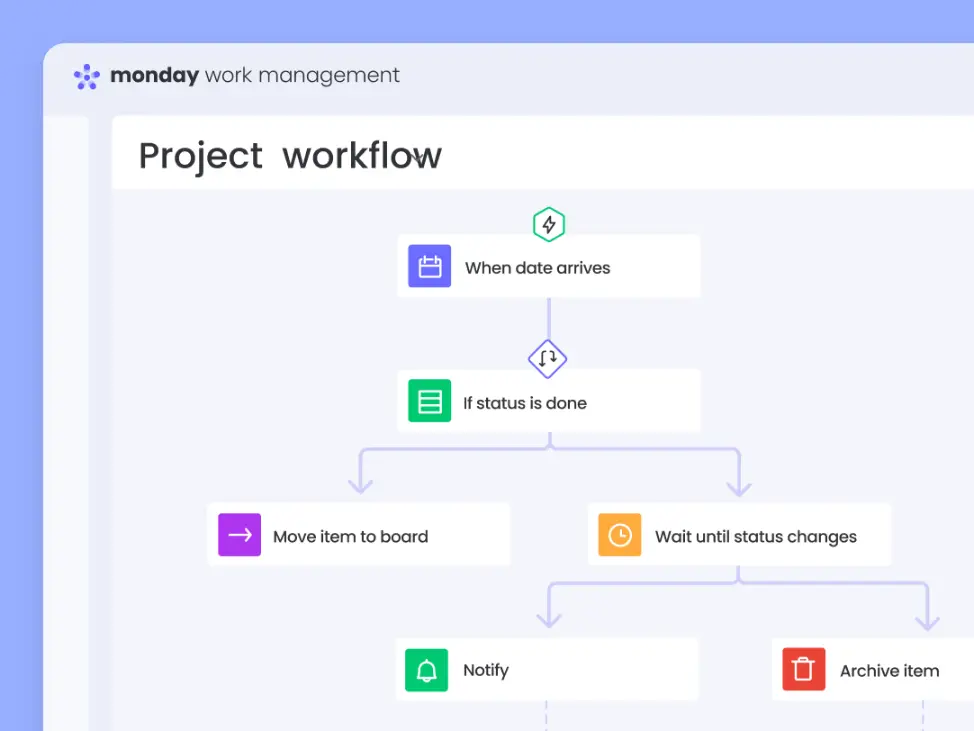
A useful monday.com overview should also explain that pricing usually depends on the number of users and the selected feature tier. This means costs can increase as teams expand. For some SMEs, the overall investment remains reasonable when compared with the productivity and workflow improvements gained from better project visibility and automation. For others, particularly businesses with very large teams, subscription costs may become a more significant consideration.
When assessing monday.com pros and cons, pricing flexibility is both a strength and a limitation. On one hand, businesses can choose a plan that matches their requirements rather than paying for unnecessary enterprise functionality. On the other hand, certain features that users may consider essential are restricted to higher plans.
Another consideration involves implementation efficiency. Businesses that fully utilise automations, dashboards and integrations may achieve stronger returns on investment because the platform becomes embedded into daily operations. In contrast, businesses using monday.com only as a basic task list may not experience enough productivity gains to justify upgrading.
The free two-seat forever style offer can still provide meaningful value for founders testing operational systems during early business growth. It allows teams to experiment with workflows and collaboration structures before scaling usage across departments or larger teams. However, businesses should always verify current plan structures, eligibility rules and limitations because pricing and promotions may change over time.
For many UK businesses, monday.com pricing becomes easier to justify when the platform replaces several disconnected systems or reduces operational inefficiencies that cost time and resources elsewhere in the business.
monday.com Discount and Two Free Seats Forever Offer
One of the most appealing aspects for smaller businesses considering the platform is the potential monday.com discount opportunity created through the Free Plan structure. While monday.com does not always promote traditional coupon-style discounts in the same way some software providers do, eligible users may still benefit from long-term savings through the availability of two free seats forever.
For freelancers, founders, startups and very small teams, this offer can significantly reduce the barrier to entry. Instead of paying immediately for project management software, businesses can start using monday.com without ongoing subscription costs while they test workflows, collaboration processes and operational systems. This makes the platform more accessible for businesses that are still validating processes or managing tighter budgets during growth stages.
The two-seat structure is especially useful for co-founders or small partnerships. For example, two directors running a startup together may be able to use monday.com for project planning, operational tracking and task management without requiring an immediate paid subscription. Likewise, a freelancer working with a virtual assistant or contractor may find the free structure sufficient initially.
A proper monday.com overview should clarify that the free option is not unlimited. While users can access the platform without payment, feature restrictions still apply. Certain advanced functions such as larger automation allowances, integrations, advanced dashboards and expanded reporting may require upgrades to paid plans. Businesses should therefore view the Free Plan as a starting point rather than a fully unrestricted version of the software.
The main monday.com benefits of the free offer include lower upfront costs, reduced implementation risk and the ability to learn the platform before scaling usage. This can be valuable because businesses often need time to determine whether a project management system genuinely fits their workflows and communication style.
Businesses considering the offer should also understand that eligibility, plan structures and promotional availability may change. Software providers regularly update features, pricing tiers and usage limits. Because of this, businesses should always review the latest terms and conditions before relying on specific offer details.
For businesses planning long-term growth, the free plan can also act as a transition stage into larger operational systems. Teams can begin with simple task management and later expand into automations, dashboards, integrations and department-level workflows as operational complexity increases.
When discussing monday.com pros and cons, the free two-seat structure is clearly one of the strongest advantages for very small businesses. However, larger teams will likely need paid subscriptions relatively quickly once collaboration needs expand beyond the free limitations.
If you want to explore the current offer and check eligibility details, you can start here: https://startupdeals.co.uk/recommends/monday-com
monday.com vs Alternatives
When businesses research project management software, they rarely look at monday.com in isolation. Most companies compare it against other well-known platforms such as Trello, Asana, ClickUp, Notion or Jira before making a decision. A balanced monday.com overview should therefore explain how the platform compares in terms of usability, flexibility, scalability and overall business suitability.
Compared with Trello, monday.com generally offers more advanced workflow and operational management features. Trello is often praised for simplicity and ease of use, particularly for smaller teams managing straightforward task boards. However, businesses that need dashboards, automations, reporting structures or more detailed workflows may find monday.com more scalable in the long term. This scalability is one of the key monday.com benefits for growing businesses that expect operational complexity to increase over time.
Compared with Asana, monday.com tends to feel more visual and customisable. Asana is strong for structured project management and team coordination, but some users prefer monday.com’s colourful interface and flexible board structure. monday.com also appeals to businesses wanting broader operational use cases beyond traditional project management alone.
ClickUp is another major competitor and is often considered highly feature-rich. However, some businesses find ClickUp more complex to configure and manage. monday.com generally provides a smoother onboarding experience for teams that prioritise simplicity and usability alongside functionality. This balance between accessibility and capability is one reason monday.com continues to appeal to SMEs and startups.
Notion occupies a slightly different category because it combines note-taking, documentation and workspace management. Some startups use Notion for operational planning and internal knowledge management, but monday.com usually provides stronger workflow tracking, reporting and automation features for structured project execution.
For technical development teams, Jira may still offer stronger capabilities around agile software development and sprint management. However, Jira can feel more technical and less approachable for non-development departments. monday.com may therefore be more suitable for businesses wanting a broader company-wide operational platform that marketing, operations, leadership and client-facing teams can all use comfortably.
One of the biggest monday.com benefits compared with alternatives is flexibility without excessive technical complexity. Businesses can create customised workflows without needing advanced setup knowledge or development resources. This makes the platform particularly attractive for founders and managers who want operational visibility without managing overly complicated systems.
In terms of monday.com pros and cons, competitors may outperform monday.com in specific niche areas. For example, Trello may feel simpler for very basic task management, while Jira may suit software engineering teams better. However, monday.com performs strongly as an all-round operational and collaboration platform for growing businesses.
The free two-seat structure may also make monday.com more accessible than some competitors for early-stage businesses wanting to test software before investing in larger subscriptions. As always, businesses should review current eligibility rules and offer details directly before relying on promotional availability.
For businesses wanting a flexible, visual and scalable work management platform that can support multiple departments, monday.com remains one of the strongest all-round options available in 2026.
Is monday.com Worth It?
For many businesses, the answer is yes. This monday.com Review shows that the platform successfully combines usability, flexibility and scalability in a way that appeals to startups, SMEs, agencies, freelancers and growing teams.
One of the strongest reasons businesses choose monday.com is because it improves visibility. Instead of relying on disconnected spreadsheets, emails and messaging tools, teams can manage work within one structured environment. This creates clearer accountability, easier collaboration and more organised project delivery. For businesses struggling with communication gaps or inconsistent workflows, these monday.com benefits can quickly become noticeable.
Another important advantage is flexibility. monday.com is not limited to one style of project management. Businesses can use it for operational planning, sales pipelines, marketing campaigns, HR workflows, onboarding systems, content calendars or client management. This adaptability allows the platform to grow alongside the business rather than forcing teams to replace systems as operational needs evolve.
The automation functionality also adds meaningful value. Reducing repetitive admin tasks can save businesses time while improving consistency across workflows. As teams grow larger, these efficiencies become increasingly important. Combined with dashboards and integrations, monday.com can become a central operational platform rather than simply a task management tool.
Of course, there are some limitations to consider. Businesses wanting advanced features may eventually need higher-tier plans, and setup can require some planning to achieve the best results. However, these considerations are relatively common across modern workflow software platforms.
The free two-seat structure remains one of the more attractive entry points available for small businesses. It allows founders, freelancers and small teams to explore the platform without immediate subscription costs. This can reduce risk during the evaluation process and help businesses understand whether the software fits their workflow style before committing financially.
A useful monday.com overview should also acknowledge that the platform works best when teams actively engage with it. Like any project management system, successful implementation depends on consistent usage, clear processes and team adoption. Businesses willing to invest time into setup and workflow organisation are likely to experience stronger results.
In terms of monday.com pros and cons, the positives will outweigh the negatives for most growing businesses that value operational visibility, collaboration and scalability. The platform is especially appealing for organisations that want something more advanced than basic task management but less intimidating than enterprise project management software.
If you want to test the platform and explore the current free offer, you can start here: https://startupdeals.co.uk/recommends/monday-com
General FAQs About monday.com
What is monday.com used for?
monday.com is used for project management, workflow organisation, task tracking, collaboration and operational planning across teams and businesses.
Is monday.com good for small businesses?
Yes, many SMEs and startups choose monday.com because the platform is flexible, scalable and relatively easy to use compared with some enterprise systems.
What are the main monday.com benefits?
Key monday.com benefits include workflow visibility, automation, collaboration tools, dashboards and flexible project management structures.
Does monday.com offer a free plan?
Yes, eligible users may be able to access two free seats forever through the Free Plan structure, although feature limitations apply.
What are the main monday.com pros and cons?
The main monday.com pros and cons include strong flexibility and collaboration features balanced against paid feature limitations and setup learning time.
Is monday.com suitable for remote teams?
Yes, monday.com works well for remote and hybrid teams because it centralises communication, tasks and project visibility in one platform.
Can freelancers use monday.com?
Yes, freelancers often use monday.com to manage clients, deadlines, projects, invoices and operational workflows more efficiently.
Does monday.com include automation features?
Yes, automation is one of the major monday.com benefits, helping businesses reduce repetitive admin and improve workflow consistency.
Is monday.com difficult to learn?
Most users find monday.com relatively approachable, especially compared with more technical enterprise project management systems.
What does a typical monday.com overview include?
A typical monday.com overview explains the platform’s boards, workflows, dashboards, automations, integrations and collaboration tools.
Is monday.com better than spreadsheets?
For many businesses, yes. monday.com provides stronger visibility, collaboration and workflow tracking compared with traditional spreadsheets.
Can monday.com scale with growing businesses?
Yes, one of the biggest monday.com benefits is scalability, allowing businesses to expand workflows, users and operational systems over time.
FAQs About the monday.com Offer
What is the monday.com free offer?
Eligible users may be able to access two free seats forever through monday.com’s Free Plan structure.
Is the monday.com offer available in the UK?
Yes, UK businesses may be eligible for the free seat offer, subject to current availability and terms.
How long does the monday.com free offer last?
The two-seat structure is promoted as free forever for eligible users, although platform terms and plan structures may change.
Is the monday.com discount suitable for startups?
Yes, many startups use the free plan to test workflows, project tracking and operational systems before scaling.
What are the main monday.com benefits of the free plan?
The main monday.com benefits include reduced upfront costs, workflow visibility and the ability to test the software before upgrading.
Does the free plan support remote teams?
Yes, remote and hybrid teams can still benefit from centralised collaboration and task management features.
Should businesses check the terms before signing up?
Yes, all promotional structures and eligibility requirements are subject to change—check current T&Cs before registering.
Recap
This monday.com Review shows why the platform remains one of the most widely used project and workflow management tools for growing businesses in 2026. For UK startups, SMEs, freelancers and founders, monday.com offers a flexible system that can improve organisation, collaboration and operational visibility without feeling overly technical or difficult to adopt.
Throughout this guide, we explored the main monday.com benefits including workflow automation, project visibility, scalability, dashboards, integrations and collaborative task management. We also covered the most important monday.com pros and cons so businesses can make a balanced and informed decision before investing time or money into implementation.
One of the platform’s strongest advantages is flexibility. Businesses can use monday.com for marketing, operations, HR, project delivery, onboarding, sales tracking and broader workflow management. Rather than forcing teams into one rigid structure, the platform adapts to how businesses already work.
The free two-seat structure may also appeal to smaller teams wanting to test the software before upgrading. For founders or freelancers exploring project management systems for the first time, this can reduce risk and improve confidence during the evaluation process. As always, eligibility and promotional terms are subject to change.
If you want to explore the platform further and check the latest offer details, you can start here: https://startupdeals.co.uk/recommends/monday-com
Conclusion
Choosing the right project management platform can have a major impact on productivity, communication and operational efficiency. This monday.com Review demonstrates that monday.com continues to stand out in 2026 because it balances usability, flexibility and scalability in a way that suits many different types of businesses.
For startups and SMEs, the platform provides a structured way to manage growth without introducing unnecessary complexity. Teams can centralise projects, improve accountability, automate repetitive admin tasks and gain clearer visibility across workflows. These monday.com benefits become increasingly valuable as businesses expand and operational demands become harder to manage informally.
The platform is also versatile enough to support multiple departments and use cases. Whether businesses need project tracking, campaign planning, operational oversight or team collaboration tools, monday.com offers a flexible environment that can adapt alongside evolving business requirements.
Of course, there are some considerations to keep in mind. Businesses wanting advanced automations, integrations and reporting functionality may eventually need higher-tier subscriptions. Likewise, teams will achieve the best results when they invest time into building clear workflows and encouraging consistent platform usage.
However, for many businesses, the overall value proposition remains strong. The combination of visual project management, automation, collaboration and scalability makes monday.com one of the most practical all-round operational platforms available today. The free two-seat structure also creates a lower-risk entry point for founders and small teams testing workflow software for the first time.
If you want to explore the platform, review the latest eligibility details and check the current offer, you can get started here: https://startupdeals.co.uk/recommends/monday-com
Latest posts:
- Zempler Bank Review 2026: Is It Good Value for UK Startups?
 Introduction Zempler Bank offers a genuine UK business bank account from £0 per month, with app and online banking, Post Office cash deposits and built-in tools for invoicing, receipts and… Read more: Zempler Bank Review 2026: Is It Good Value for UK Startups?
 - Hoxton Mix vs Virtually There: Which Virtual Office Service Is Better?
 Introduction If you’re comparing Hoxton Mix vs Virtually There, you’re likely searching for a virtual office provider that offers the right balance of professionalism, affordability, and flexibility. Whether you’re launching… Read more: Hoxton Mix vs Virtually There: Which Virtual Office Service Is Better?
 - Hoxton Mix vs Icon Offices: Which Virtual Office Is Better?
 Introduction Choosing a virtual office provider can have a significant impact on how your business is perceived, how you manage your mail, and even how effectively you maintain privacy as… Read more: Hoxton Mix vs Icon Offices: Which Virtual Office Is Better?
 - 7 Powerful Benefits of Using a Hoxton Mix Virtual Office Address
 Introduction For startups, freelancers, sole traders and growing SMEs, establishing a professional business presence can be challenging. Renting physical office space in London is often expensive, particularly during the early… Read more: 7 Powerful Benefits of Using a Hoxton Mix Virtual Office Address
 - Hoxton Mix Review: Features, Pricing, Pros and Cons Explained
 Introduction If you’re searching for an honest and detailed hoxton mix review, you’re likely comparing virtual office providers and trying to decide whether Hoxton Mix offers good value for your… Read more: Hoxton Mix Review: Features, Pricing, Pros and Cons Explained
 - Hoxton Mix Virtual Office Discount: Save 10% on Your First 12 Months
 Introduction If you’re looking for a professional London business address without the cost of renting physical office space, a Hoxton Mix Virtual Office discount could help you reduce your startup… Read more: Hoxton Mix Virtual Office Discount: Save 10% on Your First 12 Months
 - Tide Referral Code 2026: Powerful Guide to Claim £200 Cashback with STARTUP200
 Introduction If you’re looking for a Tide referral code in 2026, you’re probably searching for the best possible deal before opening a business account. Whether you’re a sole trader, freelancer,… Read more: Tide Referral Code 2026: Powerful Guide to Claim £200 Cashback with STARTUP200
 - Tide vs High Street Banks: Powerful 2026 Review
 Introduction Choosing the right business banking solution is one of the most important decisions a UK business owner can make. Whether you’re a sole trader, freelancer, contractor, startup founder, or… Read more: Tide vs High Street Banks: Powerful 2026 Review
 - Tide Business Account for Tradespeople | Powerful Guide 2026
 Introduction Running a trade business involves much more than completing jobs and keeping customers happy. Whether you’re a plumber, electrician, builder, carpenter, roofer, landscaper, painter, heating engineer, or general contractor,… Read more: Tide Business Account for Tradespeople | Powerful Guide 2026