
Introduction
This Dropbox Review is for UK sole traders, startups, freelancers, founders and small business owners who want a simple, reliable way to store, organise, share and protect business files online. Whether you are sending client documents, managing project assets, backing up key files or collaborating with a remote team, Dropbox remains one of the most recognisable cloud storage platforms in the market.
For many small businesses, file storage becomes messy quickly. Documents sit across laptops, email attachments, WhatsApp threads, USB drives and shared folders with unclear permissions. That creates version-control issues, security risks and wasted time. Dropbox aims to solve that problem by giving businesses a central place to store files, sync them across devices, share them securely and recover content if something is deleted or changed by mistake.
Dropbox for startups can be particularly useful when a new business needs a professional file system before investing in heavier IT infrastructure. Dropbox for small businesses can also work well for teams that need straightforward document sharing without a steep learning curve. Its strengths are ease of use, reliable syncing, file recovery, permissions and collaboration features. However, it is not always the cheapest option, and some businesses may prefer Google Drive, Microsoft OneDrive or Box depending on their existing software stack.
There is also a simple joining offer available: you can earn 500MB when signing up to Dropbox through the Startup Deals link. This type of Dropbox discount is modest compared with a paid-plan saving, but it can still be useful if you want to start with extra free storage before deciding whether Dropbox is right for your business. Offer availability, eligibility and storage rewards may vary, so always check the latest terms before signing up. Dropbox’s own referral information states that Basic users can earn 500MB of storage per successful referral, up to a maximum referral allowance.
In this Dropbox review, we will look at how Dropbox works, who it is best suited to, the key features, Dropbox pros and cons, pricing considerations, how it compares with alternatives, and whether it is still a strong choice for UK businesses in 2026.
Contents
What Is Dropbox?
Dropbox Review: Is It Still Worth It in 2026?
Who Is Dropbox Applicable For?
Benefits of Dropbox for UK Businesses
Key Dropbox Features Explained
Dropbox for Startups
Dropbox for Small Businesses
How to Get Started with Dropbox Step by Step
Dropbox Pros and Cons
Dropbox vs Google Drive, OneDrive and Box
Dropbox Discount Offer: Get 500MB Free When Signing Up to Dropbox
Dropbox Pricing and Plans
Dropbox Security, Backups and File Recovery
General FAQs About Dropbox
FAQs About the Dropbox Offer
Recap
Conclusion
What Is Dropbox?
Dropbox is a cloud storage and file-sharing platform that helps individuals and businesses store documents, photos, videos, folders and project files online. Instead of keeping everything on one laptop or sending documents back and forth by email, Dropbox gives you a central online workspace where files can be saved, synced, shared and accessed from different devices.
At its simplest, Dropbox works like an online folder. You upload a file to Dropbox, and you can then open it from your computer, phone, tablet or web browser. If you install the desktop app, files can sync automatically between your device and your Dropbox account. This is one of the main reasons Dropbox became popular: it makes cloud storage feel familiar, rather than forcing users to learn a completely new way of working.
For businesses, Dropbox goes beyond basic storage. It can support shared folders, file permissions, password-protected links, transfer tools, file recovery, version history, admin controls and team management features, depending on the plan selected. Dropbox’s business plans are designed for professional and team use, with plan options that include storage, backup, sharing controls and support features. Dropbox states that its business products include storage and backup, alongside security features such as file recovery, password protection, watermarking and viewer history.
This is why Dropbox for small businesses remains relevant in 2026. A small business might use Dropbox to store contracts, proposals, brand assets, invoices, website files, product photography, onboarding documents or internal templates. A freelancer might use it to share folders with clients. A startup might use it as a lightweight document hub before building more formal systems.
Dropbox for startups can also be useful when founders are working across multiple devices and need to keep files available without constantly asking, “Which version is the latest?” When used properly, Dropbox can reduce attachment overload, avoid duplicated documents and make collaboration cleaner.
That said, Dropbox is not the only option. Many businesses already use Microsoft 365 or Google Workspace, and those ecosystems include OneDrive or Google Drive. This is where the decision becomes less about whether Dropbox works and more about whether it fits your existing tools, budget and workflow. This Dropbox Review will help you weigh those practical trade-offs before committing.

Dropbox Review: Is It Still Worth It in 2026?
Dropbox is still worth considering in 2026 if your business wants reliable cloud storage, simple file sharing and a cleaner way to manage documents across devices. Its biggest strength is usability. Most people understand Dropbox quickly, which matters for small teams that do not want to spend weeks training staff or building complex document management processes.
For UK freelancers and sole traders, Dropbox can be a practical way to separate business files from personal storage. You can create folders for clients, projects, tax records, contracts, marketing assets and operational documents. For small teams, Dropbox can help centralise files so people are not relying on scattered email attachments or local desktop folders.
Dropbox for startups is especially useful when a team is moving quickly and needs a simple, flexible storage system. Early-stage businesses often have messy file habits because the priority is growth, sales and delivery. Dropbox can provide enough structure to keep important files accessible without forcing the company into an enterprise-level document system too early.
Dropbox for small businesses also works well when external sharing is important. If you regularly send files to clients, accountants, designers, developers, agencies or suppliers, Dropbox links and shared folders can feel easier than sending large attachments. Depending on your plan, Dropbox also offers professional controls that help reduce the risk of files being accessed by the wrong person.
However, this Dropbox Review would not be balanced without looking at the drawbacks. Dropbox can become expensive compared with bundled alternatives. If your business already pays for Microsoft 365, OneDrive may feel like better value because it is included in many plans. If your team lives inside Google Docs, Google Drive may feel more natural. Dropbox is strongest when file syncing, folder sharing and cross-platform simplicity are more important than deep integration with one office suite.
There is also the question of whether you need a paid plan immediately. Dropbox Basic offers a free account with 2GB of storage, while paid personal and team plans provide higher storage allowances and additional features. Dropbox’s current plan pages show options including Plus, Standard, Advanced and Enterprise-style plans, though pricing and feature availability can vary by billing cycle and region.
For most UK startups and SMEs, Dropbox is worth it if you value simple storage, dependable sync, professional sharing and file recovery. It is less compelling if you mainly need live document editing inside Google Workspace or Microsoft 365. The best approach is to start with the offer, test the workflow, and upgrade only if Dropbox becomes central to how your business manages files.
Who Is Dropbox Applicable For?
Dropbox is designed for a broad range of users, but it is particularly well suited to startups, freelancers, remote teams, agencies and small businesses that need simple cloud storage without heavy technical setup. One of the reasons Dropbox has remained popular for so long is that it works for both solo users and growing teams, making it flexible as a business evolves.
For freelancers and sole traders, Dropbox can provide a professional way to organise files and collaborate with clients. Designers may use it to share artwork and branding assets, photographers can deliver image folders, consultants can manage reports and contracts, and developers can keep project files synced across multiple devices. Instead of searching through email threads for attachments, everything can sit in one accessible location.
Dropbox for startups is especially useful during the early growth stage. New businesses often work across shared laptops, remote contractors and fast-moving projects, which creates confusion around file ownership and version control. Dropbox helps reduce that friction by centralising documents and making them easier to access from anywhere. A startup founder can upload investor decks, legal documents, product mock-ups, onboarding files and operational templates into structured folders that can be shared securely with the wider team.
Dropbox for small businesses also works well for teams that collaborate externally. Accountants, virtual assistants, marketing agencies, web developers and suppliers often need access to business documents without being added into a full internal system. Dropbox’s sharing features allow businesses to send files or folders without relying on oversized email attachments.
Businesses with hybrid or remote teams may also find Dropbox appealing because it works consistently across Windows, Mac, Android, iPhone and browser access. Employees can move between devices without losing access to files. That flexibility matters in modern working environments where people are no longer tied to a single office computer.
However, Dropbox may not be ideal for every organisation. Larger enterprises that need advanced compliance workflows, highly customised permissions or deep integration into internal infrastructure may prefer more enterprise-focused platforms. Likewise, businesses already heavily invested in Microsoft 365 or Google Workspace may decide that OneDrive or Google Drive offers better value because storage is bundled into existing subscriptions.
This is why understanding your workflow matters more than simply comparing storage limits. If your business prioritises easy syncing, external sharing, remote access and file reliability, Dropbox remains a strong option in 2026. If your business relies more heavily on live document editing within office suites, alternatives may be more efficient.
Benefits of Dropbox for UK Businesses
One of the biggest benefits of Dropbox is simplicity. Many cloud platforms become overloaded with features that smaller businesses never fully use, but Dropbox keeps the experience relatively straightforward. For startups and SMEs that want fast deployment without technical complexity, this is a major advantage.
The first key benefit is reliable file syncing. Dropbox built its reputation around fast and dependable syncing between devices, and this remains one of its strongest features today. Files uploaded on one device quickly become available elsewhere, which helps teams stay aligned without manually sending updated versions. For businesses managing lots of active documents, this can save significant time.
Another major advantage is accessibility. Dropbox works across desktop, mobile and browser environments, making it useful for remote teams and business owners who travel regularly. A founder can start working on a presentation in the office, continue editing from home and then access the same file from a phone while travelling. Dropbox for startups is particularly useful in flexible working environments where team members are spread across locations.
Dropbox for small businesses also delivers value through sharing and collaboration. Businesses can send files through secure links rather than attaching documents to emails. Shared folders make it easier to collaborate with clients, contractors and suppliers without constantly uploading new versions. Depending on the plan selected, users can also manage permissions, passwords and expiry settings for shared links.
Backup and recovery features are another benefit. Businesses frequently underestimate the importance of version history and deleted file recovery until something goes wrong. Dropbox includes recovery tools that can help restore deleted content or earlier versions of files, reducing the risk of accidental loss. Dropbox highlights recovery and rollback functionality as part of its business-focused platform offering.
Security is also an important factor. Dropbox includes encryption, account protections and admin controls designed to help businesses protect sensitive files. While no cloud platform is risk-free, Dropbox has invested heavily in security features to remain competitive in the business storage market.
Another benefit is scalability. A sole trader may begin with a free or entry-level account and later move into a business plan as the team grows. That flexibility makes Dropbox appealing because businesses do not necessarily need to commit to a large infrastructure investment immediately.
Of course, Dropbox pros and cons should always be weighed carefully. While Dropbox excels in usability and syncing, some competitors may provide more storage value or tighter office-suite integration. Even so, Dropbox remains one of the strongest cloud storage platforms for businesses that prioritise simplicity, reliability and collaboration.
Key Dropbox Features Explained
Dropbox includes a wide range of features aimed at improving file storage, collaboration and business productivity. While many people still think of Dropbox as a basic cloud drive, the platform has evolved into a broader business workspace with tools that support modern remote and hybrid teams.
The core feature is cloud storage and syncing. Dropbox allows users to store files online and access them from multiple devices. Once the desktop app is installed, folders sync automatically between devices and the cloud. This reduces the need for manual uploads and makes it easier for teams to stay aligned on the latest file versions.
File sharing is another major feature. Users can create links to files or folders and share them externally without sending large attachments by email. Depending on the plan, Dropbox supports password-protected links, expiry dates and permission controls. These tools are especially valuable for Dropbox for small businesses that regularly exchange files with clients or contractors.
Dropbox Transfer is designed for sending large files securely. Rather than giving ongoing folder access, users can send downloadable file packages to recipients. This can be useful for agencies, designers, video editors and photographers delivering completed work.
Version history and file recovery are also important features. If a file is deleted accidentally or overwritten, Dropbox allows users to restore earlier versions within a defined recovery window based on their plan. For businesses handling critical documents, this adds an important layer of protection.
Dropbox Paper provides lightweight collaborative documents for note-taking, brainstorming and team planning. While it is not intended to replace full office suites, it can support quick collaboration within projects.
Smart Sync is another feature that helps manage storage space on local devices. Files remain visible in folders without necessarily taking up full hard-drive space until they are opened. This can be particularly useful for startups or remote teams using laptops with limited storage capacity.
Dropbox for startups may also benefit from integrations with platforms such as Slack, Zoom, Microsoft Office and Google Workspace. These integrations help Dropbox fit more naturally into existing business workflows rather than forcing teams to operate in isolation.
Security features include encryption, account protections and admin controls for team plans. Dropbox states that it uses encryption in transit and at rest, alongside additional controls for business customers.
Understanding these tools is important when evaluating Dropbox pros and cons. While some businesses may not need every feature, Dropbox’s combination of syncing, sharing, recovery and collaboration tools makes it one of the most user-friendly cloud storage platforms for UK businesses in 2026.
Dropbox for Startups
Dropbox for startups can be an effective solution for organising files, improving collaboration and reducing operational chaos during the early stages of growth. Many startups begin with informal systems where documents are scattered across laptops, email threads, messaging apps and personal drives. While this may work temporarily, it quickly becomes difficult to manage as teams grow and projects become more complex.
One of the main reasons startups choose Dropbox is speed and simplicity. It takes very little time to create a shared file structure and start collaborating. Founders can create folders for finance, legal documents, investor materials, marketing assets, onboarding resources and operational processes without needing dedicated IT support.
This is particularly useful for remote-first or hybrid startups. Team members can access files from multiple devices and locations, making collaboration easier across distributed teams. A startup founder might work from home, a co-working space and client meetings throughout the week, while contractors operate from entirely different cities or countries. Dropbox keeps documents accessible regardless of location.
Dropbox for startups is also valuable when external collaboration is frequent. Startups often work with freelancers, developers, designers, agencies and advisors during their growth phase. Dropbox allows businesses to share folders or transfer files securely without constantly emailing attachments or creating duplicate versions of documents.
Another benefit is scalability. Startups rarely know exactly how their infrastructure needs will evolve over the next 12–24 months. Dropbox allows businesses to begin with a relatively lightweight setup and expand storage or collaboration capabilities later if needed. This flexibility makes it easier to control costs during early growth stages.
Version history and recovery tools are also important for startups moving quickly. Fast-moving teams regularly overwrite files, delete documents accidentally or lose track of versions. Dropbox’s recovery and version tools help reduce the risk of permanent file loss. Dropbox highlights version history and file recovery as part of its core cloud storage functionality.
However, startups should still evaluate Dropbox pros and cons carefully. If a business already runs heavily inside Google Workspace or Microsoft 365, it may prefer a more tightly integrated storage solution. Likewise, startups working primarily with live collaborative documents may find Google Drive more naturally embedded into daily workflows.
Even so, Dropbox remains highly attractive for startups that prioritise straightforward syncing, external sharing, file reliability and ease of use. In many cases, simplicity is more valuable than advanced enterprise complexity during the early stages of growth.
You can explore Dropbox here: https://startupdeals.co.uk/recommends/dropbox
Dropbox for Small Businesses
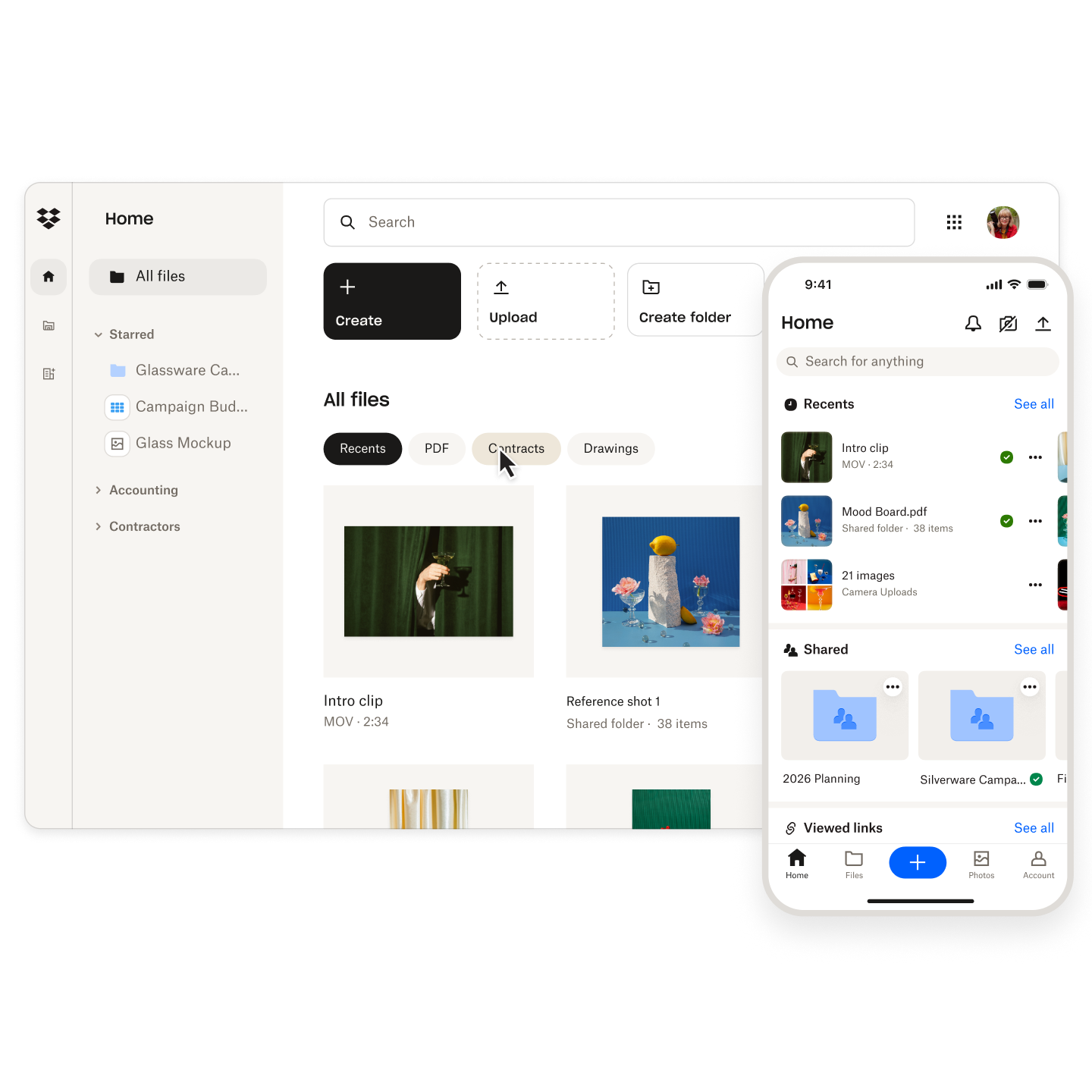
Dropbox for small businesses remains one of the most practical cloud storage solutions available in 2026, especially for teams that need simple collaboration and reliable file access without complicated setup requirements. Small businesses often lack dedicated IT departments, which means usability and reliability become more important than enterprise-level customisation.
For many SMEs, Dropbox acts as a central business filing system. Teams can organise documents into shared folders for departments, projects, clients or operational tasks. This reduces reliance on local desktop storage and helps ensure that important files remain accessible even when employees work remotely or change devices.
One of the biggest advantages for small businesses is professional file sharing. Rather than attaching large files to emails, businesses can send secure Dropbox links to clients, suppliers or contractors. This feels cleaner, faster and more professional, particularly when dealing with large presentations, image libraries, contracts or media files.
Dropbox for small businesses is also useful for collaboration with external partners. Accountants, consultants, agencies and freelancers can access relevant folders without requiring constant manual file transfers. Depending on the plan selected, businesses can apply permissions and sharing controls to help manage access securely.
Another reason SMEs choose Dropbox is ease of onboarding. Employees generally understand the folder-based system quickly because it mirrors traditional desktop storage structures. This lowers training requirements and makes adoption easier across teams with varying technical experience.
Remote access is another important benefit. Small business owners increasingly work across multiple devices, locations and flexible schedules. Dropbox allows users to access files from laptops, mobile devices or browsers without needing to carry physical storage devices or manually sync files themselves.
Security and recovery features are also valuable for SMEs. Businesses regularly handle sensitive financial information, contracts, payroll records and customer data. Dropbox includes security features designed to protect stored files, alongside recovery options that can help restore deleted or overwritten content.
Still, Dropbox pros and cons should always be considered in context. Cost can become a factor for growing teams, particularly when compared with bundled storage inside Microsoft 365 or Google Workspace subscriptions. Businesses should compare the value of Dropbox’s syncing and sharing strengths against the broader productivity ecosystems offered by competitors.
That said, Dropbox continues to perform strongly for small businesses that prioritise reliability, intuitive organisation and external collaboration. It remains particularly appealing for service-based businesses, agencies, consultants and creative teams that exchange files regularly with clients.
Businesses interested in testing the platform can currently earn 500MB when signing up to Dropbox through the Startup Deals offer. Eligibility and availability may vary, and offers are subject to change.
How to Get Started with Dropbox Step by Step
Getting started with Dropbox is relatively straightforward, which is one of the reasons the platform remains popular with startups and small businesses. Unlike some enterprise-focused systems that require complex deployment, Dropbox can usually be set up within minutes.
The first step is creating an account. Businesses can start with a free Dropbox Basic account or choose a paid plan depending on their storage and collaboration needs. New users simply register with an email address and password before verifying their account.
After registration, Dropbox encourages users to install the desktop application. This is an important step because it enables automatic syncing between devices and the cloud. Once installed, Dropbox creates a folder directly on your computer that behaves similarly to a normal desktop folder. Any files added into that folder automatically sync to your Dropbox account.
The next step is organising your file structure. This is where Dropbox for startups and Dropbox for small businesses can begin creating more professional workflows. Rather than storing files randomly, businesses should create organised folders for finance, legal documents, marketing assets, sales materials, HR records, projects and client work.
Once the folder structure is created, businesses can start uploading files and sharing access with team members. Dropbox allows users to share folders directly with collaborators or generate links for external sharing. Depending on the plan selected, businesses may also configure passwords, permissions and expiry dates for shared links.
Another important setup step is enabling security protections. Businesses should activate two-factor authentication to improve account security and reduce the risk of unauthorised access. Dropbox provides additional security guidance and admin tools for business users.
Teams may also wish to connect Dropbox with existing tools such as Slack, Zoom, Microsoft Office or Google Workspace. Integrations can improve workflows by allowing files to move more naturally between platforms.
Businesses using Dropbox for startups should also think carefully about permissions from the beginning. It is easier to establish clean access controls early rather than untangling disorganised folder permissions later as the company grows.
One of the most useful tips for new users is to avoid overcomplicating the structure initially. Start simple, focus on clear naming conventions and gradually expand the system as workflows become more defined.
For businesses wanting to test Dropbox before upgrading, the free plan combined with the 500MB sign-up offer can provide enough space to evaluate the platform properly. Offer availability and eligibility requirements may vary, and terms are subject to change.
Dropbox Pros and Cons
Every cloud storage platform has strengths and weaknesses, and understanding the Dropbox pros and cons is essential before deciding whether it is the right solution for your business. While Dropbox remains one of the most polished and reliable storage platforms available, it may not suit every workflow or budget.
One of the biggest advantages of Dropbox is ease of use. The interface is clean, familiar and relatively simple to understand, even for non-technical users. This matters for startups and SMEs that want to deploy tools quickly without extensive onboarding or staff training. Dropbox’s desktop syncing experience also remains one of the strongest in the cloud storage market.
Another major advantage is cross-platform accessibility. Dropbox works consistently across Windows, Mac, Android, iPhone and browser environments. This flexibility makes Dropbox for startups especially useful when teams operate remotely or across multiple devices.
Dropbox for small businesses also benefits from strong sharing functionality. Businesses can send large files, create shared folders and collaborate externally without relying on email attachments. Depending on the plan selected, users can apply password protection, access permissions and expiry dates to links.
Version history and file recovery are also major positives. If documents are overwritten, deleted or corrupted accidentally, Dropbox provides recovery tools that help businesses restore previous versions. This can significantly reduce the operational risk of file loss.
However, there are also disadvantages to consider. Pricing is one of the most common criticisms. Compared with Google Drive or OneDrive, Dropbox can feel expensive, especially for businesses already paying for Microsoft 365 or Google Workspace subscriptions that include storage within their ecosystems.
Live document collaboration is another area where Dropbox is less dominant. While Dropbox supports integrations and collaboration tools, Google Workspace and Microsoft 365 often provide smoother real-time editing experiences because storage is built directly into their productivity suites.
Storage limits on free plans can also feel restrictive. Dropbox Basic provides relatively limited free storage compared with some competitors, which means growing businesses may need to upgrade more quickly.
Businesses should also remember that Dropbox is primarily a cloud storage and file collaboration platform rather than a complete productivity ecosystem. Some companies prefer all-in-one solutions that combine email, calendars, meetings, storage and office apps under one subscription.
Still, the overall Dropbox pros and cons balance remains positive for many UK businesses. If simplicity, reliability, syncing and external sharing matter more than bundled office tools, Dropbox remains one of the strongest cloud storage options available in 2026.
Dropbox vs Google Drive, OneDrive and Box
Choosing between Dropbox, Google Drive, OneDrive and Box largely depends on how your business already works. All four platforms provide cloud storage and file-sharing functionality, but they differ in usability, integrations, pricing and collaboration style.
Dropbox is often viewed as the simplest and most polished file-syncing platform. Its strength lies in reliable syncing, intuitive folder structures and straightforward collaboration. Businesses that prioritise external sharing and cross-platform simplicity frequently prefer Dropbox because it feels lightweight and easy to manage.
Google Drive, by contrast, is deeply integrated into Google Workspace. Businesses using Gmail, Google Docs, Google Sheets and Google Meet often find Google Drive more convenient because everything operates within a connected ecosystem. Google Drive is particularly strong for live collaborative document editing.
OneDrive is Microsoft’s equivalent and integrates closely with Microsoft 365 products such as Word, Excel, Outlook and Teams. Businesses already paying for Microsoft subscriptions may see OneDrive as better value because storage is included within many plans. For office-heavy workflows, OneDrive can feel more natural than Dropbox.
Box is generally positioned more toward enterprise users with advanced compliance and governance requirements. Larger organisations sometimes choose Box for more complex security and administrative controls, though smaller businesses may find it less intuitive than Dropbox.
Dropbox for startups remains attractive because it is easy to deploy quickly. Early-stage businesses often do not want to spend time configuring enterprise systems or migrating heavily into one ecosystem too early. Dropbox provides a flexible middle ground that works across different workflows and software stacks.
Dropbox for small businesses also performs strongly when external collaboration is frequent. Agencies, consultants, designers and service businesses often prefer Dropbox because sharing folders and transferring files feels straightforward and professional.
However, pricing can influence the decision heavily. Businesses already paying for Microsoft 365 or Google Workspace may struggle to justify paying separately for Dropbox unless they specifically value its syncing and usability advantages.
Security and recovery features are relatively competitive across all major providers. Dropbox, Google Drive, OneDrive and Box all offer encryption, cloud storage protections and varying levels of administrative control depending on the plan selected.
The best approach is usually to evaluate how your team already works. If your workflow revolves around Google Docs, Google Drive may make more sense. If you live inside Microsoft Office, OneDrive may provide better integration. But if your business prioritises straightforward storage, external sharing and reliable syncing, Dropbox continues to be one of the strongest options available.
Dropbox Discount Offer: Get 500MB Free When Signing Up to Dropbox
Dropbox currently offers an opportunity for eligible users to earn 500MB of additional storage when signing up through referral-based promotions. For businesses wanting to test Dropbox before committing to a paid plan, this extra storage can provide a useful way to explore the platform with slightly more flexibility.
The offer is primarily aimed at new Dropbox users signing up for a Basic account. Dropbox’s referral system typically rewards users with additional storage once eligibility conditions are met. Dropbox states that Basic account users can earn 500MB per successful referral, subject to referral caps and programme terms. Referral offers and storage limits may vary over time.
For startups and SMEs, the additional storage may help when uploading project files, onboarding documents, contracts, presentations or client assets during the testing phase. While 500MB is not a huge amount of storage in modern business terms, it can still extend the usefulness of the free plan before upgrading becomes necessary.
To access the offer, users can sign up through the Startup Deals Dropbox link here: https://startupdeals.co.uk/recommends/dropbox
Eligibility requirements may apply. In most cases, the user must be new to Dropbox and complete the account setup requirements associated with the referral process. Storage rewards may only apply once qualifying actions are completed successfully.
Businesses should also be aware that referral-based Dropbox discount offers are subject to change. Dropbox may update storage amounts, qualification requirements or referral limits at any time. It is therefore important to review the current terms and conditions before relying on the offer.
There are also practical limitations to keep in mind. The free Dropbox Basic plan includes restricted storage compared with paid business plans, meaning growing businesses may eventually require an upgrade if Dropbox becomes central to daily operations.
Even so, this remains a low-risk way for startups and freelancers to evaluate the platform. Dropbox for startups can be particularly appealing during early growth stages because businesses can begin using professional cloud storage without committing to large upfront software costs.
As with any promotional offer, availability, eligibility and storage rewards are subject to change—check current T&Cs.
Dropbox Pricing and Plans
Dropbox offers a range of pricing plans designed for individuals, freelancers, startups and larger businesses. The right option depends largely on how much storage you need, how many people require access and whether advanced collaboration or security tools are important for your workflow.
The entry-level option is Dropbox Basic, which is the free version of the platform. This plan includes limited cloud storage and access to core syncing and sharing functionality. It can work well for freelancers or very small businesses wanting to test the platform before upgrading.
Paid personal plans typically include more storage, longer file recovery windows and additional sharing features. These plans are often suitable for solo professionals, consultants or creators who need reliable storage but do not require full business administration tools.
Dropbox also provides team and business-focused plans. These are designed for collaborative environments where multiple employees need shared access to files, permissions management and administrative controls. Business plans may include enhanced recovery features, admin dashboards, security tools and larger storage allowances.
Dropbox pricing changes periodically depending on billing cycles, promotions and regional adjustments. Dropbox’s official pricing pages currently list personal and business plan tiers including Plus, Essentials, Business and Enterprise-focused options. Features and storage limits can vary significantly between plans.
For many SMEs, the biggest pricing consideration is whether Dropbox offers enough additional value compared with Google Workspace or Microsoft 365. Businesses already paying for those ecosystems may already receive substantial cloud storage as part of their subscription packages.
That said, Dropbox for small businesses still appeals strongly because of its syncing quality and user experience. Some businesses are willing to pay extra specifically because Dropbox feels simpler and more reliable for external collaboration and file organisation.
Dropbox for startups can also be cost-effective initially because teams can begin on lower-cost or free plans before upgrading gradually. This allows businesses to scale storage alongside operational growth rather than committing to enterprise pricing immediately.
When comparing Dropbox pros and cons from a pricing perspective, the key question is usually whether usability and syncing justify the separate subscription cost. For many service businesses, agencies and remote teams, the answer is still yes.
Businesses considering Dropbox should review current pricing carefully before committing, as storage allowances, feature access and promotional terms can change over time.
Dropbox Security, Backups and File Recovery
Security is one of the most important considerations when choosing a cloud storage platform, especially for businesses handling client documents, contracts, financial records or sensitive operational data. Dropbox has invested heavily in security infrastructure and recovery features to remain competitive in the business cloud storage market.
Dropbox states that files are protected using encryption both in transit and at rest. This means data transferred between devices and Dropbox servers is encrypted, while stored files are also protected within Dropbox’s infrastructure. Dropbox additionally provides security guidance and administrative controls for business users.
For startups and SMEs, one of the most practical security steps is enabling two-factor authentication. This adds an additional verification layer beyond passwords and can significantly reduce the risk of unauthorised account access.
Dropbox for small businesses also includes useful sharing controls. Depending on the plan selected, businesses may restrict access permissions, add passwords to links or create expiry dates for shared files. These features can help reduce accidental exposure of sensitive documents.
Another important strength is file recovery and version history. Businesses frequently lose files accidentally through deletion, overwriting or device failures. Dropbox allows users to restore deleted content and recover previous file versions within the retention period associated with their plan.
Dropbox Backup features can also help businesses protect files stored locally on devices. This can be valuable for remote teams and freelancers who may not have formal backup systems in place.
However, businesses should still remember that cloud storage security also depends on user behaviour. Weak passwords, poor permission management and unsecured devices can still create vulnerabilities regardless of the platform used.
Dropbox pros and cons therefore extend beyond the software itself. The platform provides strong security tools, but businesses still need sensible operational practices to maximise protection.
Compared with competitors, Dropbox remains broadly competitive on security and recovery functionality. Google Drive, OneDrive and Box all provide strong protections as well, though their specific features and administrative controls differ across plans.
For most startups and SMEs, Dropbox offers more than enough security functionality for everyday business use. The combination of encryption, recovery tools, permissions and syncing reliability makes it a strong option for businesses that want practical cloud storage without excessive technical complexity.
General FAQs About Dropbox
Is Dropbox good for small businesses?
Yes, Dropbox for small businesses is popular because it offers reliable cloud storage, file syncing and straightforward collaboration without requiring complicated setup or technical knowledge.
What is Dropbox mainly used for?
Dropbox is mainly used for storing, syncing, sharing and backing up files across devices and teams. Many startups and SMEs use it to manage documents and collaborate remotely.
Is Dropbox free to use?
Yes, Dropbox offers a free Basic plan with limited storage. Businesses that need more space or advanced features can upgrade to paid plans.
How secure is Dropbox?
Dropbox includes encryption, account protection tools and file recovery features designed to help protect business data stored in the cloud.
Can Dropbox replace Google Drive?
It depends on your workflow. Dropbox focuses strongly on syncing and sharing, while Google Drive integrates more deeply with Google Workspace collaboration tools.
Does Dropbox work well for remote teams?
Yes, Dropbox for startups and remote teams works particularly well because files can be accessed across multiple devices and locations.
What are the main Dropbox pros and cons?
The main Dropbox pros and cons include excellent syncing and usability, balanced against potentially higher pricing compared with bundled alternatives like OneDrive or Google Drive.
Can I share large files with Dropbox?
Yes, Dropbox allows users to share large files and folders through links rather than sending oversized email attachments.
Is Dropbox suitable for freelancers?
Yes, freelancers often use Dropbox to manage client documents, deliver files and organise projects across devices.
Does Dropbox include file recovery?
Yes, Dropbox includes version history and deleted file recovery features, although retention periods depend on the plan selected.
Is Dropbox worth paying for
For businesses prioritising reliable syncing, simple collaboration and secure file storage, Dropbox remains a strong paid cloud storage option in 2026.
FAQs About the Dropbox Offer
What is the Dropbox sign-up offer?
Eligible users can earn 500MB of additional Dropbox storage through qualifying referral-style sign-up offers.
Who can access the Dropbox offer?
The Dropbox discount offer is generally aimed at new Dropbox users, although eligibility requirements may vary.
How do I claim the Dropbox offer?
You can access the offer through the Startup Deals Dropbox link and complete the required sign-up process. https://startupdeals.co.uk/recommends/dropbox
Does the Dropbox offer require payment?
No, the additional 500MB storage offer is typically linked to eligible account sign-ups rather than immediate paid subscriptions.
How much free storage does Dropbox Basic include?
Dropbox Basic includes limited free storage, with additional referral storage potentially increasing available capacity.
Can existing Dropbox users claim the offer?
In many cases, the Dropbox discount applies only to eligible new users, although terms may change over time.
How long does the Dropbox offer last?
Dropbox referral and promotional offers can change without notice, so users should always check the latest terms and conditions.
Can startups use the Dropbox offer?
Yes, Dropbox for startups can be a practical way to test cloud storage workflows before moving onto paid plans.
Can small businesses use the Dropbox offer?
Yes, Dropbox for small businesses can provide a low-risk way to explore file syncing and collaboration tools.
Does the offer apply worldwide?
Availability may vary depending on region, account eligibility and Dropbox promotional policies.
Is there a limit to referral storage rewards?
Yes, Dropbox applies maximum limits to referral-based storage rewards under its referral programme terms.
Can I upgrade after using the free plan?
Yes, businesses can upgrade from Dropbox Basic to paid plans if they need more storage or additional business features.
Does Dropbox offer refunds on paid plans?
Refund policies can vary depending on plan type, billing cycle and local regulations, so users should check Dropbox’s official policies.
Is the Dropbox offer subject to conditions?
Yes, all Dropbox offers are subject to eligibility requirements, availability and changing terms and conditions.
Recap
Dropbox remains one of the strongest cloud storage platforms for UK startups, freelancers and SMEs that prioritise simple collaboration, reliable syncing and easy file sharing. Throughout this Dropbox Review, the platform consistently stands out for usability, cross-device accessibility and professional document management.
Dropbox for startups works particularly well during early growth stages because businesses can deploy it quickly without needing complex infrastructure or technical expertise. Founders and remote teams can centralise important documents, collaborate externally and keep files accessible across multiple devices and locations.
Dropbox for small businesses also delivers strong value through secure sharing, version history and recovery tools. Service businesses, agencies, consultants and freelancers may especially appreciate how easy Dropbox makes external collaboration with clients and contractors.
There are, however, some Dropbox pros and cons to weigh carefully. Pricing can become higher than alternatives such as Google Drive or OneDrive, especially for businesses already paying for Microsoft 365 or Google Workspace subscriptions. Businesses should therefore assess whether Dropbox’s superior syncing experience and simplicity justify the additional cost.
For businesses wanting to test the platform first, the current 500MB sign-up offer provides a low-risk entry point before upgrading to paid plans.
You can explore Dropbox here: https://startupdeals.co.uk/recommends/dropbox
Conclusion
This Dropbox Review shows that Dropbox continues to be a highly competitive cloud storage solution for UK businesses in 2026. While the market now includes many strong alternatives, Dropbox still excels in the areas that matter most to many startups and SMEs: reliable syncing, straightforward file management, secure sharing and ease of use.
Dropbox for startups remains particularly appealing because it allows growing businesses to establish organised file systems quickly without introducing unnecessary complexity. Teams can collaborate remotely, access files from anywhere and maintain cleaner workflows without relying heavily on email attachments or scattered local storage.
Dropbox for small businesses also performs strongly for service-based companies that regularly exchange files with clients, freelancers, accountants or agencies. The platform’s combination of sharing tools, recovery features and cross-platform accessibility makes it practical for modern hybrid working environments.
Of course, businesses should still evaluate Dropbox pros and cons carefully. Companies already deeply integrated into Microsoft 365 or Google Workspace may find bundled alternatives more cost-effective. However, many businesses still prefer Dropbox because of its simplicity, syncing reliability and intuitive user experience.
The free plan and 500MB sign-up offer make Dropbox relatively easy to test before committing financially. That gives startups and SMEs an opportunity to evaluate whether Dropbox genuinely improves collaboration and document management within their business.
If you want a dependable cloud storage platform that balances simplicity with professional business functionality, Dropbox remains one of the best options available in 2026.
- Dropbox Review 2026: Powerful Cloud Storage for UK Businesses
 Introduction This Dropbox Review is for UK sole traders, startups, freelancers, founders and small business owners who want a simple, reliable way to store, organise, share and protect business files online. Whether you are sending client documents, managing project assets, backing up key files or collaborating with a remote team, Dropbox remains one of the… Read more: Dropbox Review 2026: Powerful Cloud Storage for UK Businesses
 - Elementor Review 2026: Pros, Cons & Features Explained
 Introduction Choosing the right website builder can make a major difference to how quickly a business launches online, how professional it appears, and how easily it can scale over time. In this Elementor Review, we explore whether Elementor still deserves its reputation as one of the most popular WordPress website builders for startups, freelancers, bloggers,… Read more: Elementor Review 2026: Pros, Cons & Features Explained
 - Hostinger Review 2026: Pros, Cons & Features Explained
 Introduction Choosing the right web hosting provider can make a major difference to the success of a business website, online store, blog, or startup project. In this Hostinger Review, we explore whether Hostinger still offers strong value in 2026 and whether it remains one of the best affordable hosting providers for UK startups, freelancers, sole… Read more: Hostinger Review 2026: Pros, Cons & Features Explained
 - WordPress Review 2026: Pros, Cons & Features Explained
 Introduction This WordPress Review is written for UK sole traders, SMEs, startups, freelancers and founders who need a practical way to build a professional website without wasting time or money on the wrong platform. In 2026, having a website is no longer just about looking credible. For many small businesses, it is the centre of… Read more: WordPress Review 2026: Pros, Cons & Features Explained
 - FreeAgent Review 2026: Simple Accounting for UK Businesses
 Introduction If you are searching for an honest FreeAgent review in 2026, you are probably looking for accounting software that simplifies bookkeeping, invoicing, expenses, tax returns, and financial admin without requiring expert accounting knowledge. For many UK freelancers, sole traders, startups, and growing SMEs, managing finances can quickly become time-consuming and stressful, especially when juggling… Read more: FreeAgent Review 2026: Simple Accounting for UK Businesses
 - Airwallex Global Account Review: A Powerful Platform for UK Businesses in 2026
 Introduction Managing international business finances has become increasingly complex for UK startups, SMEs, freelancers, ecommerce brands, agencies, and remote-first businesses. Modern companies often work across multiple currencies, pay overseas suppliers, manage international subscriptions, reimburse remote teams, and receive revenue from customers around the world. Traditional financial systems can make these workflows expensive, fragmented, and time-consuming.… Read more: Airwallex Global Account Review: A Powerful Platform for UK Businesses in 2026
 - Revolut business account Review 2026: Pros, Cons & Features
 Introduction Choosing the right business current account can make everyday finance simpler, cheaper and easier to control. This Revolut business account review is written for UK sole traders, freelancers, startups, founders and SMEs who want a practical, digital-first way to manage payments, cards, expenses, currencies and team spending without relying entirely on a traditional high… Read more: Revolut business account Review 2026: Pros, Cons & Features
 - Mettle business account Review 2026: Pros, Cons & Features
 Introduction Choosing the right Mettle business account can make day-to-day money management simpler, especially if you are a sole trader, freelancer, startup founder or small limited company owner looking for a mobile-first UK business current account. Business banking is no longer only about receiving payments and paying suppliers. In 2026, many small business owners want… Read more: Mettle business account Review 2026: Pros, Cons & Features
 - BusinAssist Review 2026: Virtual Office, company Formation & Startup Support
 Introduction Starting a business in the UK is exciting, but it can also feel overwhelming. From registering your company to protecting your privacy and building credibility, there are many details entrepreneurs need to get right. That’s where BusinAssist comes in. In this comprehensive Review, we’ll break down everything you need to know about this provider… Read more: BusinAssist Review 2026: Virtual Office, company Formation & Startup Support